Month-End Close
Run pre-close checks, adjust entries, and lock the period
Month-End Close
Reading time: 10 minutes
Walk through the complete month-end close process in Atlas — from pre-close checks through adjusting entries to locking the period. By the end you will have a clean, locked period with a balanced trial balance. Every screen below is the actual product.
Prerequisites
- An Atlas account with Accountant role or above
- All bank accounts reconciled for the period
- All invoices and bills for the period entered
Step 1: Pre-Close Checklist
Before closing, verify your activity for the period is complete. The sidebar groups that hold each area are:
| Check | Where to Verify |
|---|---|
| Bank accounts reconciled | Banking — look for the last-reconciled date |
| All invoices entered | Sales & AR → Invoices |
| All bills entered | Expenses & AP → Bills |
| Payroll processed (if applicable) | Payroll → Payroll Runs |
| Depreciation run (if applicable) | Fixed Assets |
| Adjusting entries posted | Accounting → Journal Entries |
Atlas also runs an automated pre-close validation on the Period Close page (Step 5). It does not re-check every item above — it verifies the bookkeeping is internally consistent: the trial balance is balanced, there are no unreconciled accounts, and there are no unposted draft entries.
Step 2: Review the Trial Balance
- Open Accounting → Reports, then choose Trial Balance under Financial Statements.
- Set the As of Date to the last day of the month.
- Confirm the green Trial balance is balanced banner, and scan for unusual balances:
- Negative cash balances (possible missing transfers)
- AR or AP balances that do not match your aging reports
- Suspense balances that need reclassification
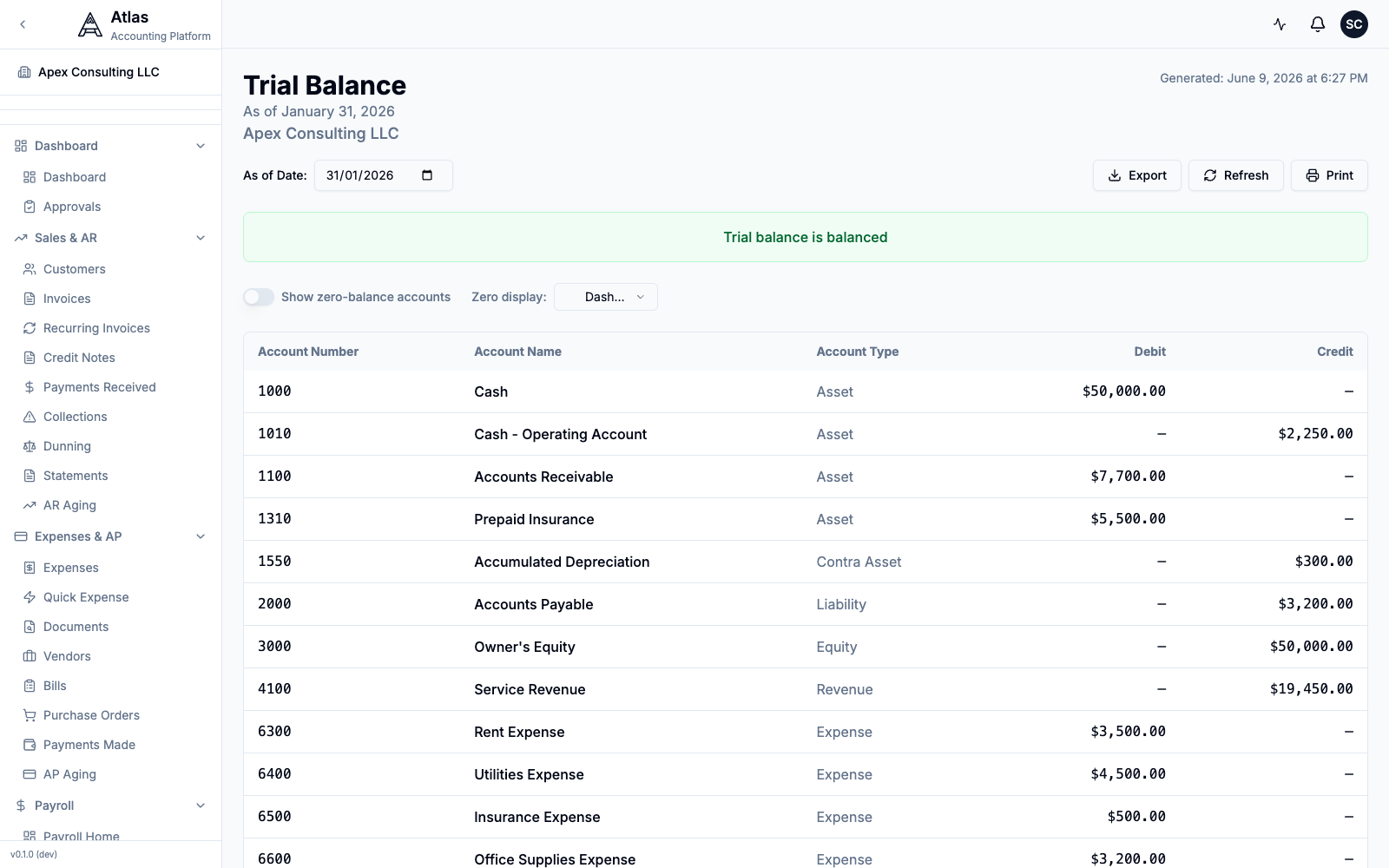 The Trial Balance report as of January 31, 2026, with the green "Trial balance is balanced" banner above the account listing.
- For any account that looks unexpected, open the General Ledger report (also under Accounting → Reports) to trace the detail.
Step 3: Post Adjusting Entries
- Go to Accounting → Journal Entries and click New Journal Entry.
- Set the Entry Date, a Description, and an optional Reference.
- Set Entry Type to Adjustment (the other option is Manual). This is how Atlas flags an adjusting entry — there is no separate checkbox.
- In the Line Items table, add a line per account: pick the Account, set its Type to Debit or Credit, and enter the Amount. Click Add Line for more lines.
- Watch the Total Debits / Total Credits footer — the entry must read Balanced before you can post it.
- Click Post Entry (or Save as Draft to finish later).
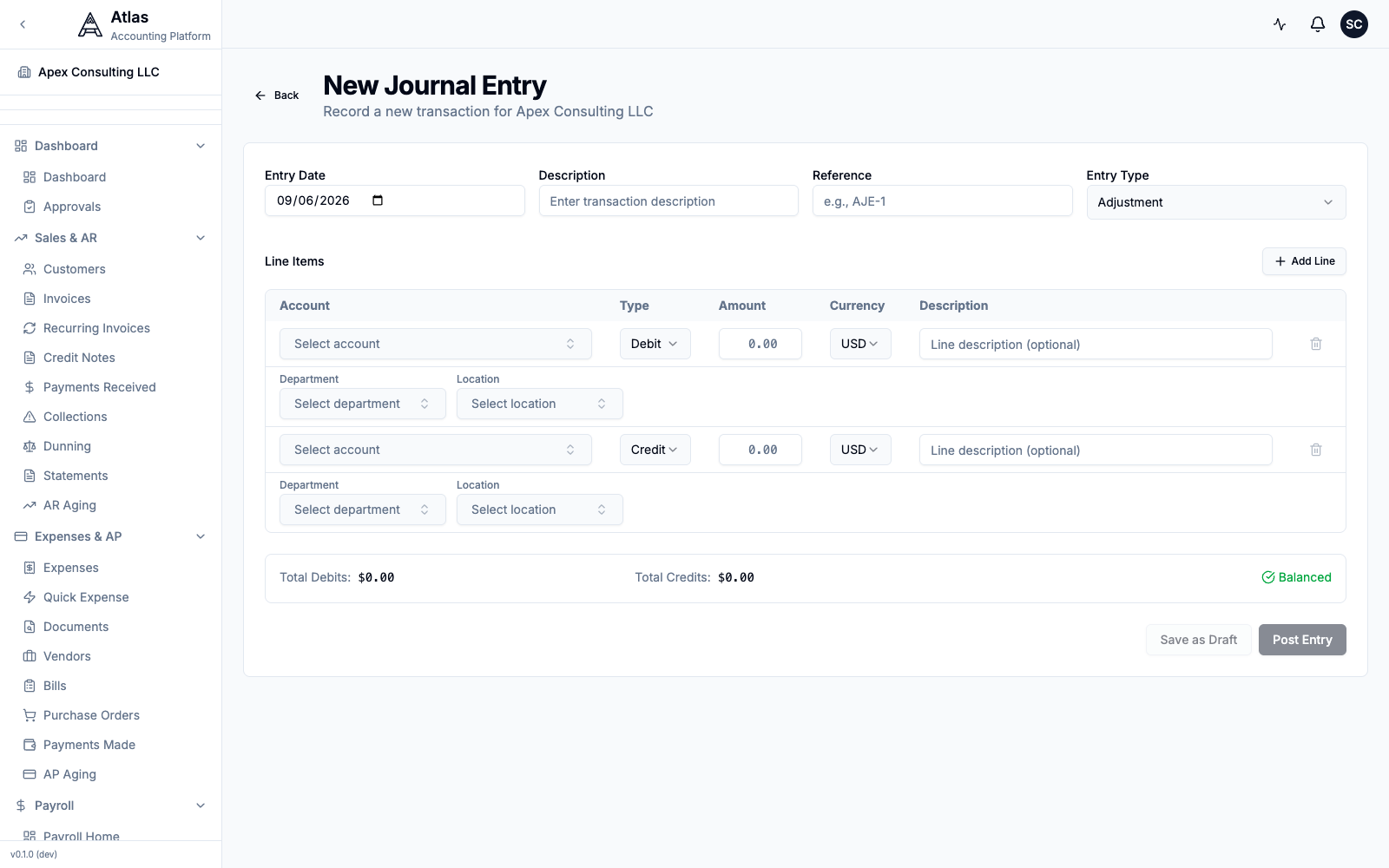 The New Journal Entry form with Entry Type set to Adjustment, debit/credit line items, and the live Balanced indicator above the Save as Draft / Post Entry buttons.
Common month-end adjustments follow the same form:
- Accrued expenses — Debit the expense account, Credit Accrued Liabilities.
- Prepaid expenses — Debit the expense account, Credit Prepaid Expenses.
- Deferred revenue — Debit Deferred Revenue (liability), Credit the Revenue account.
Tip: Atlas supports deferred revenue and expense schedules that automate recurring adjustments. See the Journal Entries guide for details.
Step 4: Run Pre-Close Validation
- Go to Accounting → Period Close.
- Choose the Year and Month to close. The status badge shows whether the period is Open or Closed.
- Click Run Validation. Atlas reports:
- Trial Balance: Balanced with Total Debits and Total Credits
- Unreconciled Accounts count
- Draft Entries count
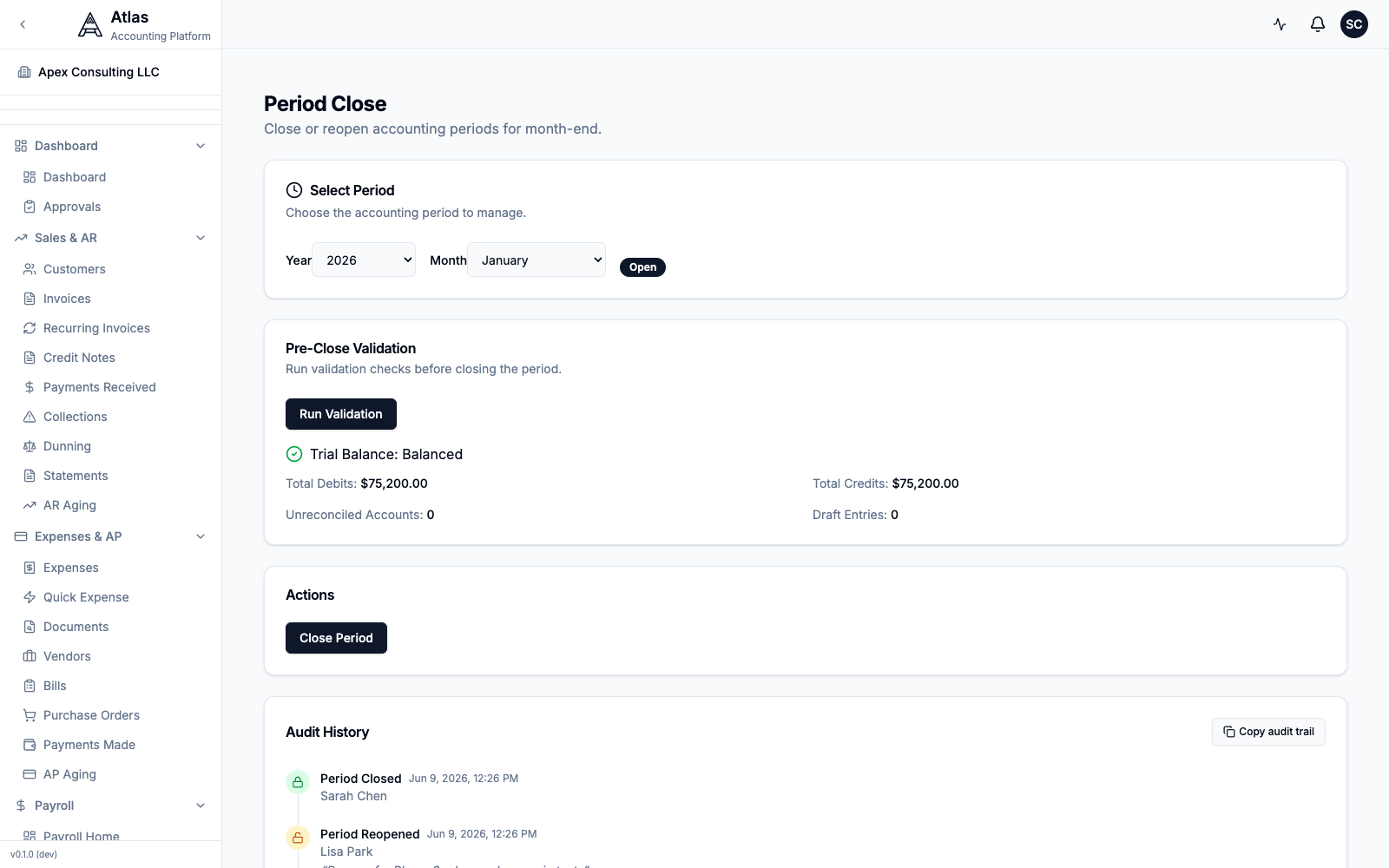 The Period Close page for January 2026: the period selector showing "Open", and pre-close validation reporting a balanced trial balance of $75,200.00 with zero unreconciled accounts and zero draft entries.
The Close Period button stays disabled until you run validation. If the trial balance is unbalanced or draft entries remain, resolve them (use the General Ledger report to trace a discrepancy) before continuing.
Step 5: Close the Period
- With validation passing, click Close Period.
- A confirmation dialog summarises the trial balance, draft-entry count, and unreconciled-account count, and warns that no new journal entries can be posted to the period after closing. Add optional Close Notes for the audit trail.
- Click Close Period to confirm.
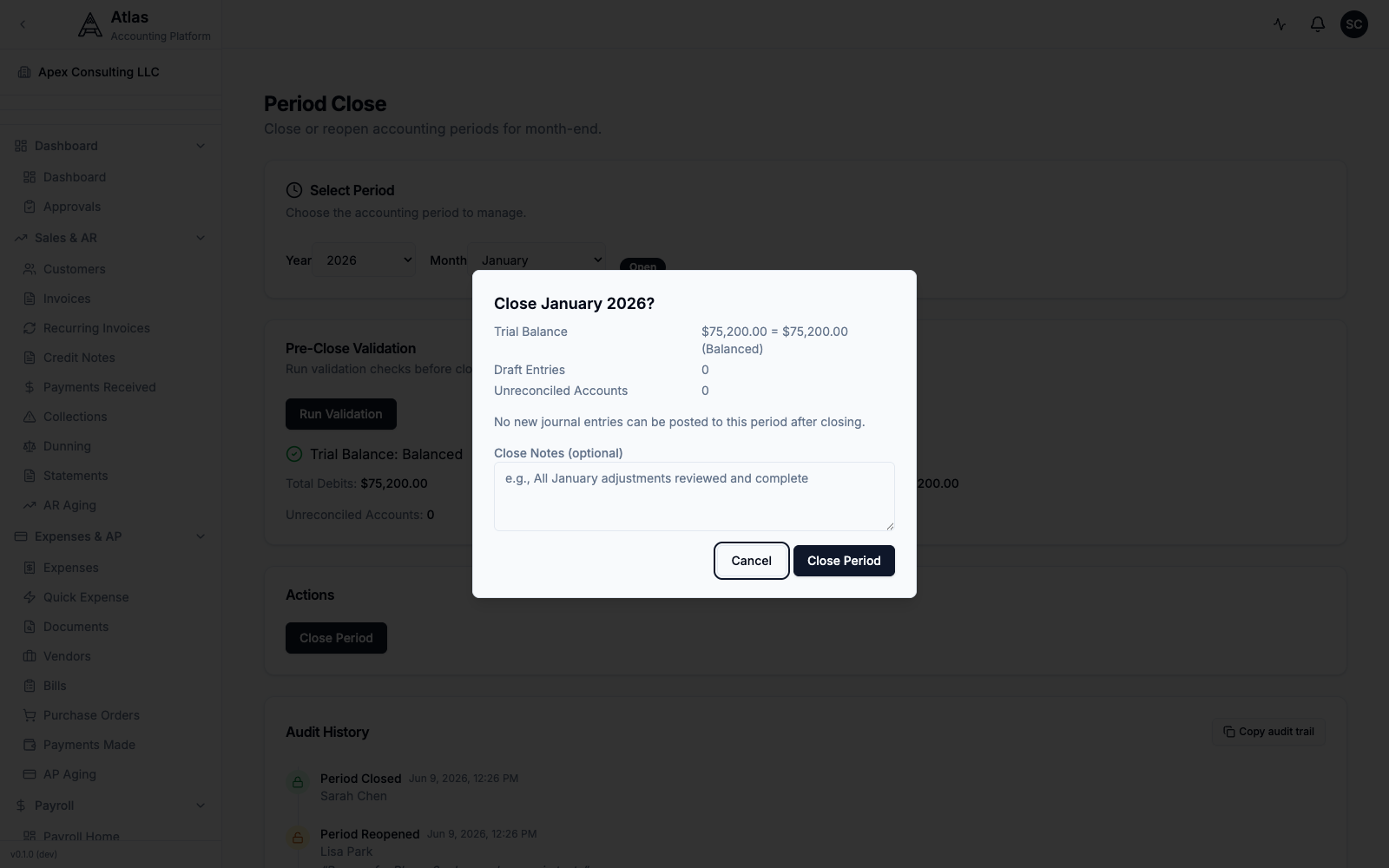 The "Close January 2026?" confirmation dialog showing the balanced trial balance, zero draft entries and unreconciled accounts, a Close Notes field, and Cancel / Close Period buttons.
What Happens When You Close
- The period is locked — no new entries can be posted to dates within it.
- The close (and the validation figures) are recorded in the Audit History on the same page, with who closed it and when.
- Reopening a closed period is a privileged action — it appears in the audit trail and is typically restricted to an owner or admin. Reopen from the same Period Close page by selecting the period and using the reopen action.
Important: If you need to make corrections after closing, either reopen the period (privileged) or post a correcting entry in the next open period.
Step 6: Generate Reports
With the period closed, open Accounting → Reports and generate your standard package from the Financial Statements section:
- Profit & Loss — revenue and expenses for the month
- Balance Sheet — financial position as of month end
- Cash Flow — cash movements during the month
- Trial Balance — final, locked balances
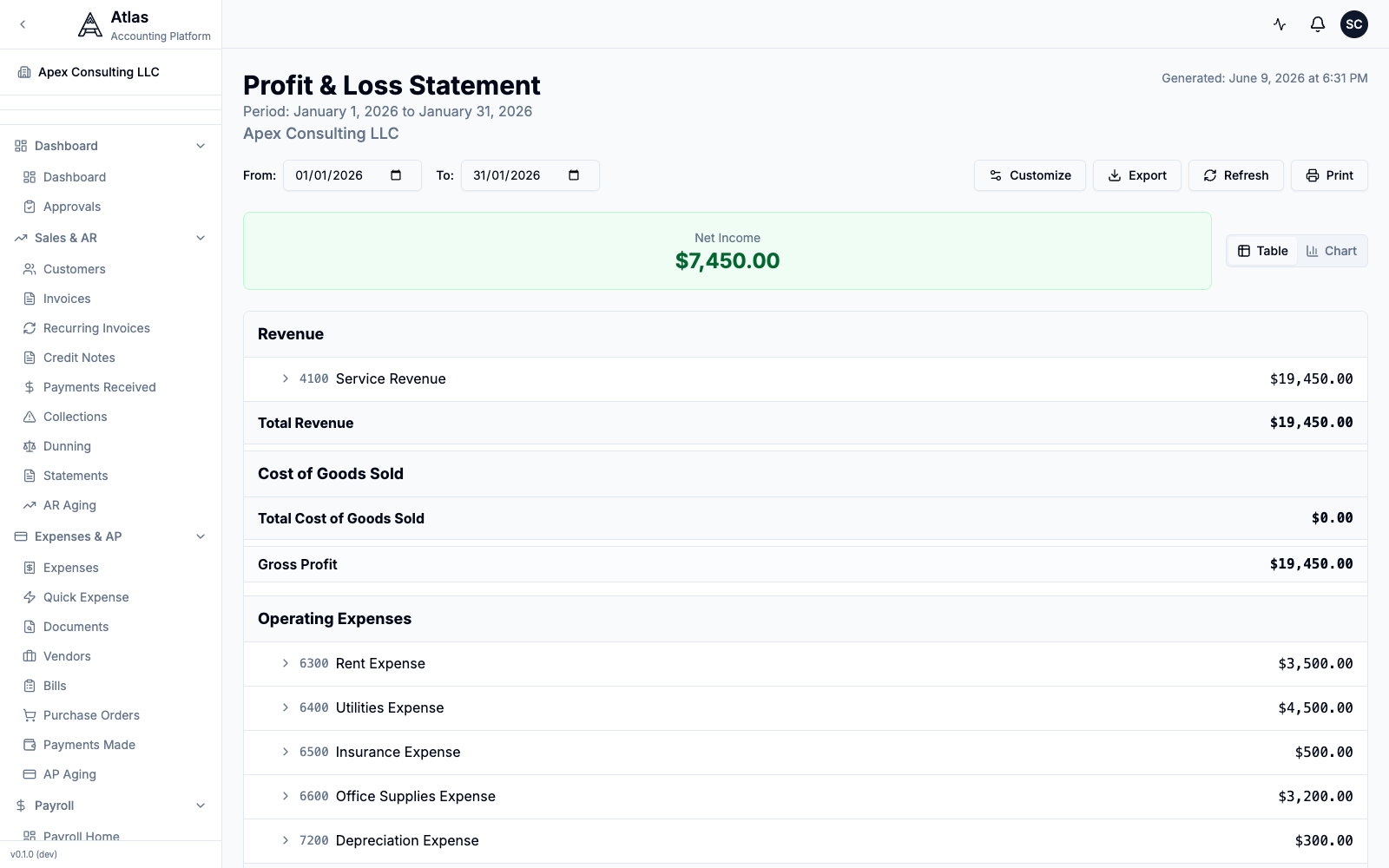 The Profit & Loss statement for January 2026, showing Net Income of $7,450.00 over $19,450.00 of revenue and $12,000.00 of operating expenses.
Troubleshooting
| Issue | Solution |
|---|---|
| Close Period is disabled | Run Run Validation first — the button stays disabled until you do |
| Cannot close period | Validation must show a balanced trial balance and zero draft entries |
| Trial balance does not balance | Open the General Ledger report to trace the discrepancy |
| Missing transactions | Check draft invoices/bills that were never posted |
| Need to edit a closed period | Reopen it from Accounting → Period Close (privileged action) |
Related Guides
- Journal Entries & Accounting — adjusting entries and deferred schedules
- Reports & Analytics — generating financial statements
- Chart of Accounts — account structure best practices
What's Next
After closing the month:
- Review budget vs. actual for variance analysis
- Set up email digests for automated monthly report delivery
- Plan next month's close by keeping the checklist up to date throughout the period