FreshBooks Quick Start
Everything you know in FreshBooks, mapped to Atlas
Atlas Quick Start Guide for FreshBooks Users
Everything you know in FreshBooks, mapped to Atlas. Reading time: 6 minutes
Terminology Rosetta Stone
| FreshBooks Term | Atlas Equivalent | Notes |
|---|---|---|
| Clients | Customers | Same concept — contacts you invoice |
| Invoices | Invoices | Same — with line items, due dates, payment tracking |
| Recurring Templates | Recurring Invoices | Auto-generated on schedule |
| Estimates | (coming soon) | Use draft invoices as a workaround |
| Expenses | Bills or Journal Entries | FreshBooks "Expenses" covers both vendor bills and direct expenses |
| Bills (Expenses > Bills) | Bills | Same concept |
| Payments | Payments Received / Payments Made | Split by AR (received) and AP (made) |
| Bank Connections | Banking | Bank account management and reconciliation |
| Chart of Accounts | Chart of Accounts | FreshBooks has a simplified version; Atlas is full hierarchical COA |
| Reports | Reports | Atlas has 15+ report types vs FreshBooks' core set |
| Projects | Projects | Same — with time tracking and profitability |
| Time Tracking | Time Tracking | Log billable/non-billable hours |
| Team Members | Settings > Team Members | User management with roles |
| Accountant (invite) | Accountant role | Invite with Accountant permissions |
| Retainers | (manual) | Record as prepayment via Journal Entry |
| Proposals | (not supported) | Outside accounting scope |
| Dashboard | Dashboard | KPI overview with action items |
| Late Payment Reminders | Dunning | Automated collection reminders |
| Client Portal | Portal | Client-facing document and report access |
Where Did My Stuff Go?
| What You Want to Do | In FreshBooks | In Atlas |
|---|---|---|
| Create an invoice | Invoices > New Invoice | Invoices > New Invoice |
| Create a recurring invoice | Recurring Templates > New | Invoices > Recurring tab |
| Record a payment | Invoices > [invoice] > Record Payment | Payments > New Payment |
| Log an expense | Expenses > New Expense | Bills > New Bill or Journal Entries |
| Enter a vendor bill | Expenses > Bills | Bills > New Bill |
| Track time | Time Tracking > New Entry | Time Tracking (sidebar) |
| Manage a project | Projects > [project] | Projects (sidebar) |
| Bank reconciliation | Banking > Reconciliation | Banking > [Account] > Reconcile |
| Run Profit & Loss | Reports > Profit & Loss | Reports > Profit & Loss |
| Run Balance Sheet | Reports > Balance Sheet | Reports > Balance Sheet |
| View expense report | Reports > Expense Report | Reports > Profit & Loss (expense section) |
| Manage clients | Clients list | Customers (sidebar) |
| Invite accountant | Settings > invite accountant | Settings > Team Members (Accountant role) |
| Set up payment reminders | Settings > Late Payment Reminders | Dunning (sidebar) |
| View dashboard | Dashboard | Dashboard |
What Atlas Does Better
1. Full Double-Entry Accounting
FreshBooks is designed for invoicing-first businesses (freelancers, agencies). Its accounting features are simplified — many users outgrow it. Atlas is a complete double-entry bookkeeping system with:
- Full Chart of Accounts with hierarchical structure
- Journal entries with unlimited debit/credit lines
- Trial Balance, General Ledger, and Cash Flow Statement
- Period close with locking
2. Accounts Payable (Real AP Management)
FreshBooks' bill management is basic. Atlas provides full AP workflows:
- Purchase orders with conversion to bills
- Bill approval workflows (multi-step)
- AP Aging reports (30/60/90/120+ days)
- Vendor credit tracking
3. Multi-Entity Consolidation
FreshBooks supports "multiple businesses" but each is a separate account with no consolidated view. Atlas provides:
- Multiple companies in one organization
- Consolidated BS, P&L, CF, and Trial Balance
- Intercompany eliminations
4. AI-Powered Transaction Categorization
FreshBooks has basic bank categorization. Atlas uses a 4-tier AI engine:
- Exact rules → Fuzzy matching → Keyword detection → LLM fallback
- Auto-posts at 90%+ confidence, queues the rest for review
- Learns from every correction
5. Enterprise-Ready Features
As your business grows, Atlas scales with you:
- 6 roles with 61 granular permissions
- Multi-step approval workflows
- Budget creation and variance analysis
- Fixed asset tracking with depreciation
- Inventory management (FIFO, LIFO, Weighted Average)
- Multi-currency with 150+ currencies and FX revaluation
- Tax compliance for 6 countries
Migration: Moving from FreshBooks to Atlas
FreshBooks isn't a direct-connect integration — today the only native connector is QuickBooks Online (Xero is marked Coming Soon under Settings > Integrations). Migrating from FreshBooks is a quick CSV export and import: pull your clients, invoices, and expenses out of FreshBooks, then run them through Atlas's import wizard.
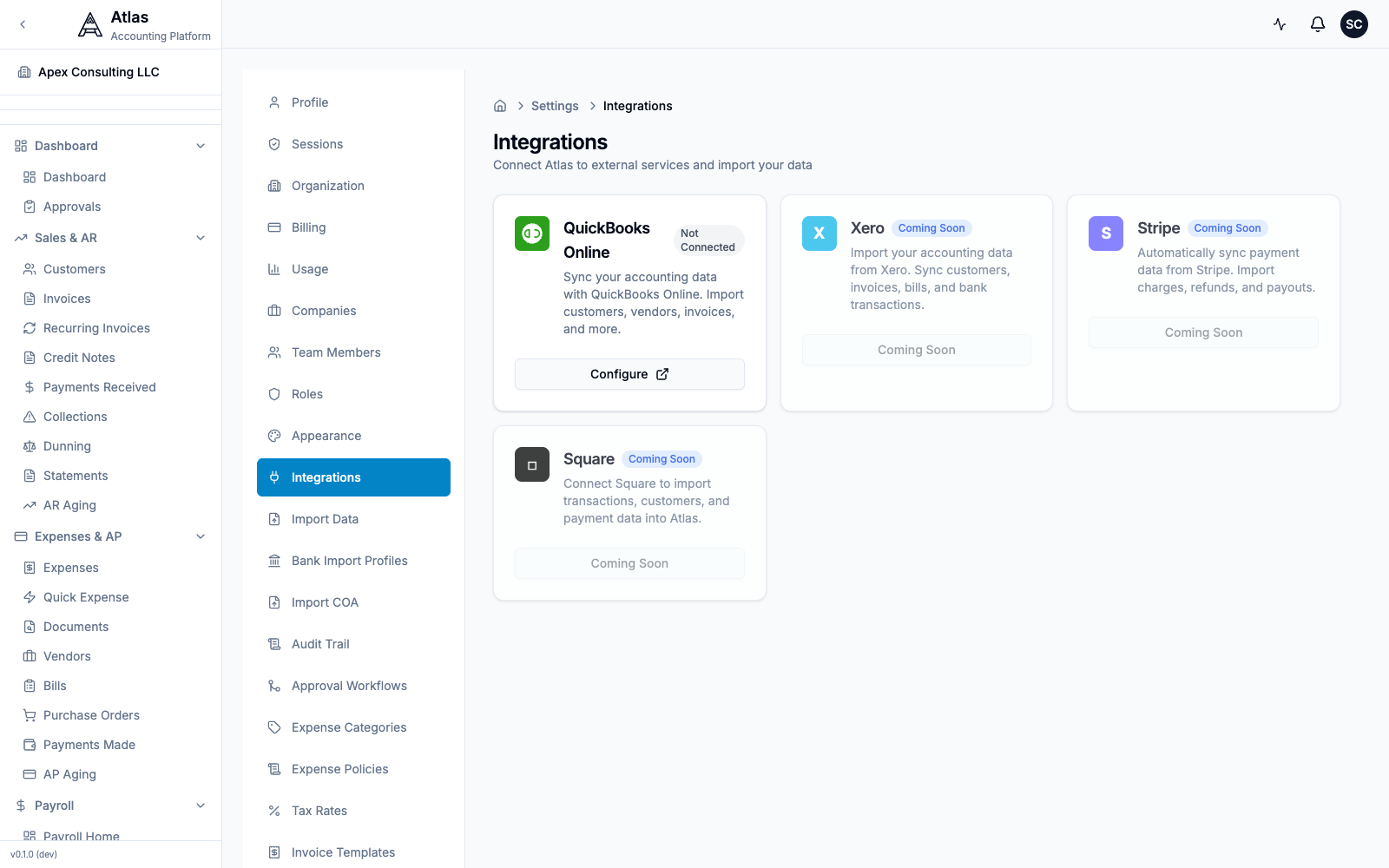 The Settings > Integrations screen. QuickBooks Online is the only connectable provider today; FreshBooks migrates via CSV import.
Step 1: Export from FreshBooks
| Data | How to Export from FreshBooks |
|---|---|
| Clients | Clients > Export (CSV) |
| Invoices | Invoices > Export (CSV) |
| Expenses | Expenses > Export (CSV) |
| Payments | Reports > Payments Collected > Export |
| Items / Services | Settings > Import/Export > Export Items |
| Chart of Accounts | Reports > Chart of Accounts > Export |
Step 2: Import into Atlas
- Go to Settings > Import Data in Atlas
- Download the matching CSV template (Customers, Vendors, Chart of Accounts, Invoices, or Bills) so your FreshBooks columns line up
- Upload your CSV file and follow the 4-step wizard: Upload → Preview → Import → Complete
- Preview the data, resolve any conflicts, and confirm
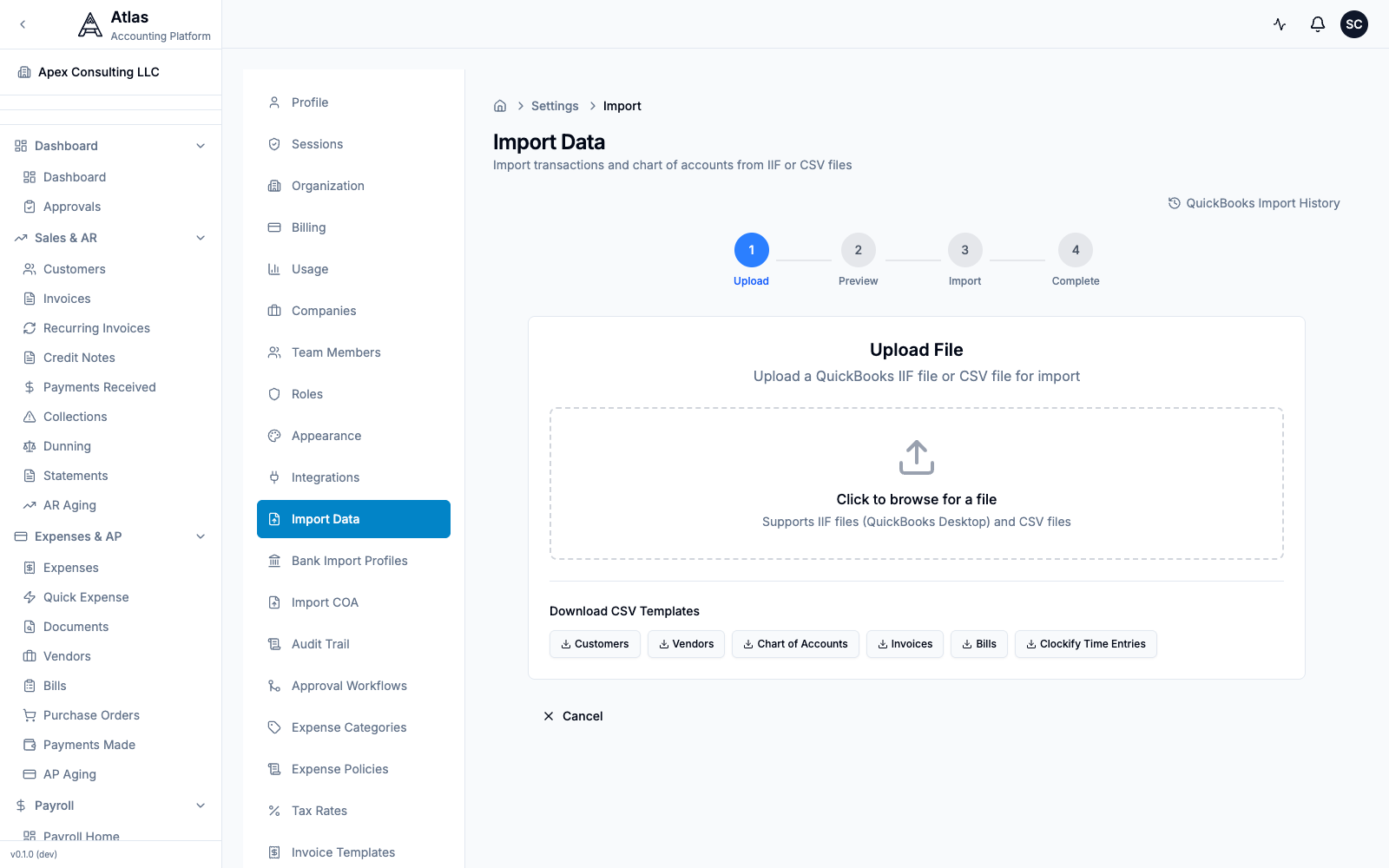 The Settings > Import Data screen: a 4-step Upload → Preview → Import → Complete wizard that accepts CSV or IIF files, with downloadable CSV templates for Customers, Vendors, Chart of Accounts, Invoices, and Bills.
Tip: to import just your chart of accounts, use Settings > Import COA (CSV or XLSX, with a downloadable template).
Step 3: Set Opening Balances
- Choose a cutover date (month-end)
- Run a Trial Balance in FreshBooks (if available) or P&L + Balance Sheet
- Enter opening balances in Atlas during onboarding
- Verify with an Atlas Trial Balance
Step 4: Verify
- Compare revenue totals between systems
- Check that all open invoices appear in Atlas
- Verify outstanding bills match
- Run a test invoice cycle
10-Minute Setup Checklist
- Sign up and create your organization
- Run the onboarding wizard — company name, country, industry
- Chart of Accounts — pick a template (Atlas offers 16 templates)
- Opening balances — enter as of your cutover date
- Import clients — upload your FreshBooks client export as Customers
- Import open invoices — bring over unpaid invoices
- Add bank accounts — set up for reconciliation
- Import expenses as bills — convert FreshBooks expenses to Atlas bills
- Invite your team — assign roles
- Run P&L — compare against FreshBooks for validation
Feature Comparison
| Feature | FreshBooks | Atlas |
|---|---|---|
| Invoicing | Core strength | Full invoicing + recurring + credit notes |
| Double-entry bookkeeping | Simplified | Full (JEs, GL, TB) |
| Chart of Accounts | Basic | Hierarchical, templated, importable |
| Bills & AP | Basic | Full AP with POs, approvals, aging |
| Bank reconciliation | Yes | Yes + AI auto-matching |
| AI categorization | Basic | 4-tier with confidence scoring |
| Multi-company | Separate accounts | Multiple per organization |
| Consolidated reporting | No | Yes (BS, P&L, CF, TB) |
| Users | Plan-gated | Unlimited |
| Payroll | No (US add-on via Gusto) | Built-in (5 countries) |
| Multi-currency | Per-client | 150+ currencies |
| FX revaluation | No | Yes |
| Inventory | No | Yes (3 costing methods) |
| Fixed assets | No | Yes (3 depreciation methods) |
| Projects / time tracking | Yes (core strength) | Yes |
| Budgets | No | Yes + variance analysis |
| Approval workflows | Simple roles | Multi-step with conditions |
| Audit trail | Limited | Field-level, unlimited retention |
| Tax compliance | US/CA basic | US, UK, CA, AU, EU, PK |
| API | JSON API | REST (~485 endpoints) |
| Mobile app | Yes (strong) | Responsive web (native planned) |
| Proposals / Estimates | Yes | Coming soon |
FAQ
Q: FreshBooks was simple. Is Atlas too complex for my business? A: Atlas has a clean, modern interface with progressive disclosure — you see what you need. Simple tasks (invoicing, expenses, bank reconciliation) work just like FreshBooks. Advanced features (consolidation, payroll, fixed assets) are there when you need them. The command palette (Cmd+K) lets you jump to anything instantly.
Q: Where do I log expenses? A: In Atlas, direct expenses are recorded as Bills (for vendor purchases) or Journal Entries (for direct expense booking). For receipt-based expenses, attach the receipt to the bill or transaction.
Q: I use FreshBooks for time tracking. Does Atlas have it? A: Yes. Atlas includes Projects with built-in Time Tracking for billable and non-billable hours, plus project profitability reporting.
Q: What about FreshBooks' late payment reminders? A: Atlas has a Dunning system — automated collection workflows with escalation for overdue invoices. More powerful than FreshBooks' basic reminders.
Q: Can my accountant still access my books? A: Yes. Invite them via Settings > Team Members with the Accountant role. They get access to journal entries, period close, reports, and audit trail.
Q: I'm a freelancer. Is Atlas overkill? A: Atlas works well for freelancers who need real accounting (not just invoicing). If you need a P&L, Balance Sheet, or multi-currency support, Atlas provides that with a clean interface. If you only need to send invoices and track payments, FreshBooks may be simpler.
See also: Migration Checklist | QuickBooks Guide | All Guides