Zoho Books Quick Start
Everything you know in Zoho Books, mapped to Atlas
Atlas Quick Start Guide for Zoho Books Users
Everything you know in Zoho Books, mapped to Atlas. Reading time: 7 minutes
Terminology Rosetta Stone
| Zoho Books Term | Atlas Equivalent | Notes |
|---|---|---|
| Chart of Accounts | Chart of Accounts | Same concept |
| Contacts (Customers) | Customers | Dedicated customer entity for AR |
| Contacts (Vendors) | Vendors | Dedicated vendor entity for AP |
| Invoices | Invoices | Same concept |
| Recurring Invoices | Recurring Invoices | Same concept |
| Credit Notes | Credit Notes | Same concept |
| Bills | Bills | Same concept |
| Vendor Credits | Credit Notes (AP side) | Applied to vendor accounts |
| Purchase Orders | Purchase Orders | Same — with conversion to bills |
| Payment Received | Payments Received | Same concept |
| Payment Made | Payments Made | Same concept |
| Manual Journal | Journal Entries | Same concept |
| Banking > Imported Transactions | Banking > Bank Transactions | Imported or synced bank data |
| Reporting Tags | Dimensions | Custom tags for segmentation — Atlas supports unlimited |
| Projects | Projects | Same — with time tracking and profitability |
| Timesheet | Time Tracking | Log billable/non-billable hours |
| Inventory | Inventory | Atlas adds FIFO, LIFO, Weighted Average costing |
| Recurring Bills | (manual re-entry) | Create new bills from templates |
| Retainer Invoices | (manual) | Record as prepayment via JE |
| Customer Portal | Portal | Client-facing view of reports and documents |
| Accountant Access | Accountant role | Invite with Accountant role permissions |
| Approval Workflows | Approval Workflows | Atlas supports multi-step with conditions |
| Custom Fields | (via Dimensions for reporting) | Dimensions serve the reporting use case |
| Zoho Payroll (separate app) | Payroll (built-in) | Full payroll included — not a separate product |
| Estimates | (coming soon) | Use draft invoices as workaround |
Where Did My Stuff Go?
| What You Want to Do | In Zoho Books | In Atlas |
|---|---|---|
| Create an invoice | Sales > Invoices > + New | Invoices > New Invoice |
| Create a recurring invoice | Sales > Recurring Invoices > + New | Invoices > Recurring tab |
| Create a credit note | Sales > Credit Notes > + New | Credit Notes > New Credit Note |
| Record a payment | Sales > Payment Received > + New | Payments > New Payment |
| Enter a vendor bill | Purchases > Bills > + New | Bills > New Bill |
| Create a purchase order | Purchases > Purchase Orders > + New | Purchase Orders > New PO |
| Pay a vendor | Purchases > Payments Made > + New | Payments Made > New Payment |
| Record a journal entry | Accountant > Manual Journals > + New | Journal Entries > New Entry |
| Import bank transactions | Banking > Add Bank/Credit Card | Banking > [Account] > Import |
| Reconcile | Banking > select account > Reconcile | Banking > [Account] > Reconcile |
| View Chart of Accounts | Accountant > Chart of Accounts | Chart of Accounts (sidebar) |
| Set up reporting tags | Settings > Reporting Tags | Settings > Dimensions |
| Run Profit & Loss | Reports > Profit and Loss | Reports > Profit & Loss |
| Run Balance Sheet | Reports > Balance Sheet | Reports > Balance Sheet |
| Run AR Aging | Reports > Receivable Summary | Reports > AR Aging |
| Run AP Aging | Reports > Payable Summary | Reports > AP Aging |
| Closing Books | Settings > Closing Books | Accounting > Period Close |
| Manage users | Settings > Users & Roles | Settings > Team Members |
| Manage inventory | Items > Inventory | Inventory (sidebar) |
| Track projects | Projects tab | Projects (sidebar) |
| Run payroll | Zoho Payroll (separate app) | Payroll (sidebar — built-in) |
What Atlas Does Better
1. No User or Invoice Caps
Zoho Books caps users at 1–15 depending on plan ($0–$275/month) and limits invoice volumes on lower tiers. Atlas includes unlimited users and no invoice caps on any plan.
2. Multi-Entity Consolidation
Zoho Books has "Branches" but no consolidated financial reporting. Atlas provides:
- Multiple companies within a single organization
- Consolidated Balance Sheet, P&L, Cash Flow, and Trial Balance
- Intercompany eliminations with proportional allocation
- Multi-currency translation (ASC 830 compliant)
3. AI-Powered Transaction Categorization
Zoho Books relies on manual bank rules. Atlas uses a 4-tier AI engine with confidence scoring — auto-posting high-confidence items and queuing uncertain ones for human review. The AI learns from every correction.
4. Built-In Payroll (Not a Separate Product)
Zoho Payroll is a separate product with separate pricing. Atlas includes full payroll:
- US, UK, Canada, Australia, Pakistan
- Tax calculations, W-2/T4 generation
- Benefits, deductions, garnishments
- Employee self-service portal
5. Deeper Audit Trail
Zoho Books logs changes but Atlas provides field-level change tracking with old/new values in JSONB format, IP address logging, and unlimited retention — critical for compliance and SOX readiness.
Migration: Moving Your Data from Zoho Books
Atlas doesn't have a direct Zoho Books connector — today the only native integration is QuickBooks Online (Xero is marked Coming Soon under Settings > Integrations). Moving from Zoho Books is a straightforward CSV export-and-import: pull your data out of Zoho, then run it through Atlas's import wizard.
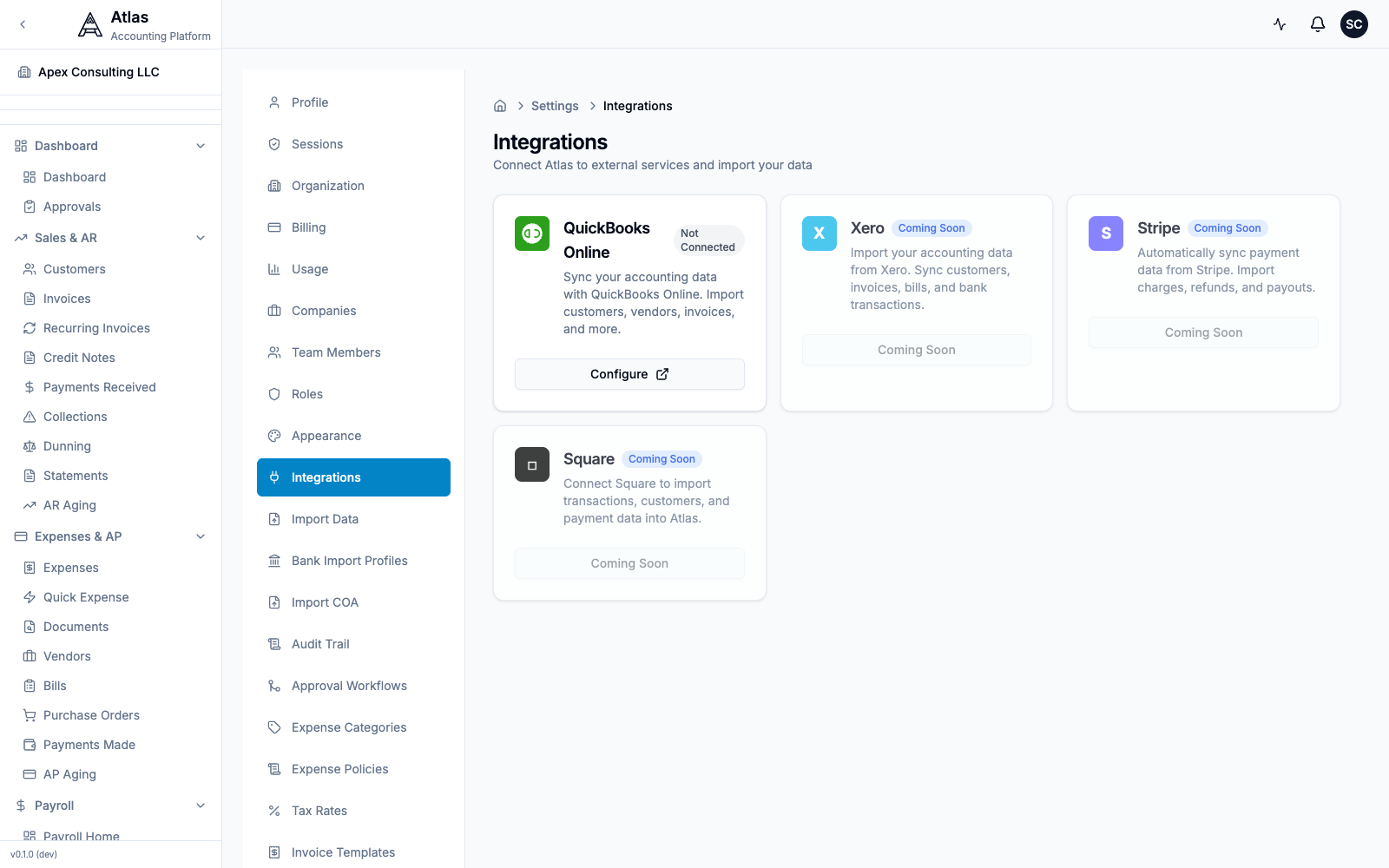 The Settings > Integrations screen. QuickBooks Online is the only connectable provider today; Xero, Stripe, and Square are Coming Soon. Zoho Books migrates via CSV import.
Step 1: Export from Zoho Books
| Data | How to Export from Zoho Books |
|---|---|
| Chart of Accounts | Accountant > Chart of Accounts > hamburger menu > Export |
| Customers | Contacts > Customers > hamburger menu > Export as CSV |
| Vendors | Contacts > Vendors > hamburger menu > Export as CSV |
| Invoices | Sales > Invoices > hamburger menu > Export as CSV |
| Bills | Purchases > Bills > hamburger menu > Export as CSV |
| Bank Transactions | Banking > select account > Export |
| Manual Journals | Accountant > Manual Journals > Export |
| Items | Items > hamburger menu > Export as CSV |
Step 2: Import into Atlas
- Go to Settings > Import Data in Atlas
- Download the matching CSV template (Customers, Vendors, Chart of Accounts, Invoices, or Bills) so your Zoho columns line up
- Upload your CSV file and follow the 4-step wizard: Upload → Preview → Import → Complete
- Preview the data, resolve any conflicts, and confirm
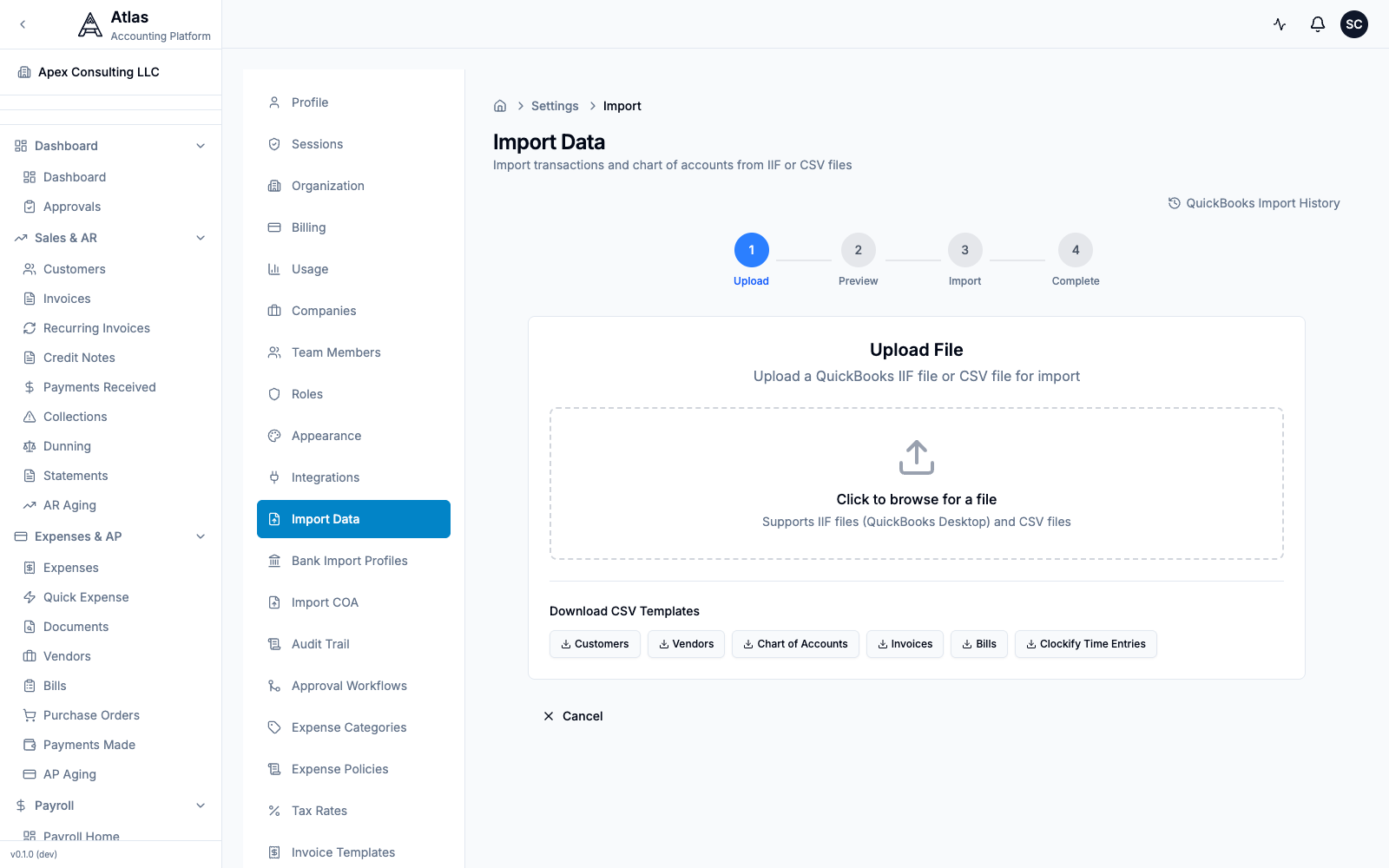 The Settings > Import Data screen: a 4-step Upload → Preview → Import → Complete wizard that accepts CSV or IIF files, with downloadable CSV templates for Customers, Vendors, Chart of Accounts, Invoices, and Bills.
Tip: to import just your chart of accounts, use Settings > Import COA (CSV or XLSX, with a downloadable template).
Step 3: Set Opening Balances
- Pick your cutover date (month-end recommended)
- Run a Trial Balance in Zoho Books as of that date
- Enter matching opening balances in Atlas during onboarding
- Verify the Atlas Trial Balance matches
Step 4: Verify
- Compare P&L and Balance Sheet between systems
- Check AR Aging and AP Aging match
- Run a test invoice cycle end-to-end
10-Minute Setup Checklist
- Sign up and create your organization
- Run the onboarding wizard — company name, country, industry
- Chart of Accounts — import your Zoho COA (CSV) or pick a template
- Opening balances — enter balances from your Zoho Trial Balance
- Import customers and vendors — upload CSV exports
- Import open invoices and bills — bring over unpaid items
- Add bank accounts — connect for reconciliation
- Set up Dimensions — recreate your Zoho Reporting Tags
- Invite your team — assign roles
- Run a Trial Balance — verify it matches Zoho
Feature Comparison
| Feature | Zoho Books | Atlas |
|---|---|---|
| Double-entry bookkeeping | Yes | Yes |
| Chart of Accounts | Yes | Yes (hierarchical, templated) |
| Invoicing | Yes (capped on lower plans) | Yes (unlimited) |
| Recurring invoices | Yes | Yes |
| Bills & AP | Yes | Yes + purchase orders |
| Bank reconciliation | Yes | Yes + AI auto-matching |
| AI categorization | No | Yes (4-tier with confidence) |
| Multi-company | Branches | Full multi-entity per org |
| Consolidated reporting | No | Yes (BS, P&L, CF, TB) |
| Users | 1–15 (by plan) | Unlimited |
| Payroll | Zoho Payroll (separate) | Built-in (5 countries) |
| Multi-currency | Per-contact basis | 150+ currencies |
| FX revaluation | No | Yes |
| Inventory | Yes | Yes (FIFO, LIFO, WA) |
| Fixed assets | No | Yes (3 methods) |
| Projects | Yes | Yes + time tracking |
| Budgets | Yes | Yes + variance analysis |
| Reporting tags / Dimensions | Yes (limited) | Unlimited dimensions |
| Approval workflows | Yes (Zoho Approvals) | Built-in multi-step |
| Audit trail | Yes | Yes (field-level, unlimited) |
| Custom roles | Yes | 6 roles, 61 permissions |
| Tax compliance | Strong India/UAE | US, UK, CA, AU, EU, PK |
| API | REST + OpenAPI | REST (~485 endpoints) |
| Mobile app | Yes (Smartwatch too) | Responsive web (native planned) |
FAQ
Q: Where are my Reporting Tags? A: Atlas calls them Dimensions. Go to Settings > Dimensions to create segments like departments, projects, and locations. Atlas supports unlimited dimensions (Zoho limits the number per plan).
Q: I use Zoho CRM + Zoho Books together. Can Atlas replace both? A: Atlas replaces Zoho Books for accounting. It includes customer and vendor management with contact details, terms, and transaction history. For full CRM features (deals pipeline, lead scoring), you'd still need a CRM tool alongside Atlas.
Q: Can I import from Zoho directly (like QuickBooks)? A: Not via a direct connection — Zoho Books isn't a listed connector under Settings > Integrations (QuickBooks is the only one today). Export your data as CSV from Zoho Books and import into Atlas via Settings > Import Data. The process takes about 15 minutes.
Q: Zoho Books has a free plan. Does Atlas? A: Atlas pricing is usage-based with unlimited users included. Check atlas.app for current plans. The value of AI automation, multi-entity consolidation, and built-in payroll typically offsets the cost difference.
Q: Where are Custom Fields? A: For reporting segmentation (the most common custom field use case), use Dimensions. For entity-specific custom data, Atlas focuses on built-in fields that cover standard accounting needs.
Q: Does Atlas support GST for India/UAE? A: Atlas currently supports US, UK, Canada, Australia, EU VAT, and Pakistan tax regimes. India and UAE tax support is on the roadmap.
See also: Migration Checklist | QuickBooks Guide | All Guides