Wave Quick Start
Everything you know in Wave, mapped to Atlas
Atlas Quick Start Guide for Wave Users
Everything you know in Wave, mapped to Atlas. Reading time: 6 minutes
Terminology Rosetta Stone
| Wave Term | Atlas Equivalent | Notes |
|---|---|---|
| Chart of Accounts | Chart of Accounts | Same concept |
| Customers | Customers | Same — contacts you invoice |
| Vendors | Vendors | Same — contacts you pay |
| Invoices | Invoices | Same concept |
| Recurring Invoices | Recurring Invoices | Auto-generated on schedule |
| Bills | Bills | Same concept |
| Transactions | Bank Transactions / Journal Entries | Bank imports or manual entries |
| Receipts (receipt scanning) | Attachments | Upload receipts to transactions |
| Bank Connections | Banking | Bank account management |
| Reconciliation | Bank Reconciliation | Same workflow |
| Reports | Reports | Atlas has 15+ types vs Wave's core 5 |
| Accounting > Journal Transactions | Journal Entries | Multi-line debit/credit entries |
| Sales Tax | Tax Rates | Tax configuration for invoices and bills |
| Payroll (paid add-on) | Payroll (built-in) | Full payroll included |
| Settings > Users | Settings > Team Members | User management with roles |
| Business Profile | Organization / Company | Your business entity |
Where Did My Stuff Go?
| What You Want to Do | In Wave | In Atlas |
|---|---|---|
| Create an invoice | Sales > Invoices > Create | Invoices > New Invoice |
| Create a recurring invoice | Sales > Recurring Invoices | Invoices > Recurring tab |
| Record a payment | Invoices > Record Payment | Payments > New Payment |
| Enter a vendor bill | Purchases > Bills > Create | Bills > New Bill |
| Pay a vendor | Purchases > Bills > Record Payment | Payments Made > New Payment |
| Record a journal entry | Accounting > Journal Transactions | Journal Entries > New Entry |
| Import bank transactions | Banking > Connected Accounts | Banking > [Account] > Import |
| Reconcile | Accounting > Reconciliation | Banking > [Account] > Reconcile |
| View Chart of Accounts | Accounting > Chart of Accounts | Chart of Accounts (sidebar) |
| Run Income Statement | Reports > Income Statement (P&L) | Reports > Profit & Loss |
| Run Balance Sheet | Reports > Balance Sheet | Reports > Balance Sheet |
| Run Sales Tax Report | Reports > Sales Tax | Reports > Tax Summary |
| Run AR Aging | Reports > Aged Receivables | Reports > AR Aging |
| Run Cash Flow | Reports > Cash Flow | Reports > Cash Flow |
| Manage users | Settings > User Management | Settings > Team Members |
| Run payroll | Payroll tab (paid add-on) | Payroll (sidebar — built-in) |
What Atlas Does Better
1. Everything Wave Does, Plus Enterprise Features
Wave is great for basic bookkeeping. Atlas includes everything Wave has plus:
- Purchase orders with bill conversion
- Multi-step approval workflows
- Budget creation and variance analysis
- Fixed asset tracking and depreciation
- Inventory management with costing methods
- Multi-entity consolidation
- Deferred revenue/expense schedules
2. Role-Based Access Control
Wave has limited user roles. Atlas provides 6 hierarchical roles with 61 granular permissions:
- Owner > Admin > Accountant > Bookkeeper > Viewer > Employee
- Separation of duties: bookkeepers create, accountants approve
- Company-level access control (restrict users to specific companies)
3. AI-Powered Transaction Categorization
Wave has basic categorization. Atlas uses a 4-tier AI engine:
- Exact rules → Fuzzy matching → Keyword detection → LLM fallback
- Auto-posts at 90%+ confidence
- Learns from every correction you make
- Custom rules for full control
4. Multi-Entity Consolidation
Wave supports multiple business profiles but has no consolidated reporting. Atlas provides:
- Multiple companies within one organization
- Consolidated Balance Sheet, P&L, Cash Flow, and Trial Balance
- Intercompany eliminations
- Multi-currency translation (ASC 830)
5. Multi-Currency with FX Revaluation
Wave handles basic foreign currency invoices. Atlas supports 150+ currencies with:
- Exchange rate management (manual or API-based updates)
- Period-end FX revaluation (unrealized gain/loss booking)
- Multi-currency consolidated reporting
6. Comprehensive Tax Compliance
Wave is US/Canada focused. Atlas supports 6 countries:
- US: 1099-NEC/MISC/K, Schedule C, State Sales Tax, Quarterly Estimates, W-2
- UK: VAT MTD (Making Tax Digital)
- Canada: GST/HST
- Australia: BAS (Business Activity Statement)
- EU: VAT OSS (One-Stop Shop)
- Pakistan: WHT certificates, provincial sales tax
Migration: Moving from Wave to Atlas
Wave isn't a direct-connect integration — today the only native connector is QuickBooks Online (Xero is marked Coming Soon under Settings > Integrations). Migrating from Wave is a quick CSV export and import: pull your data out of Wave, then run it through Atlas's import wizard.
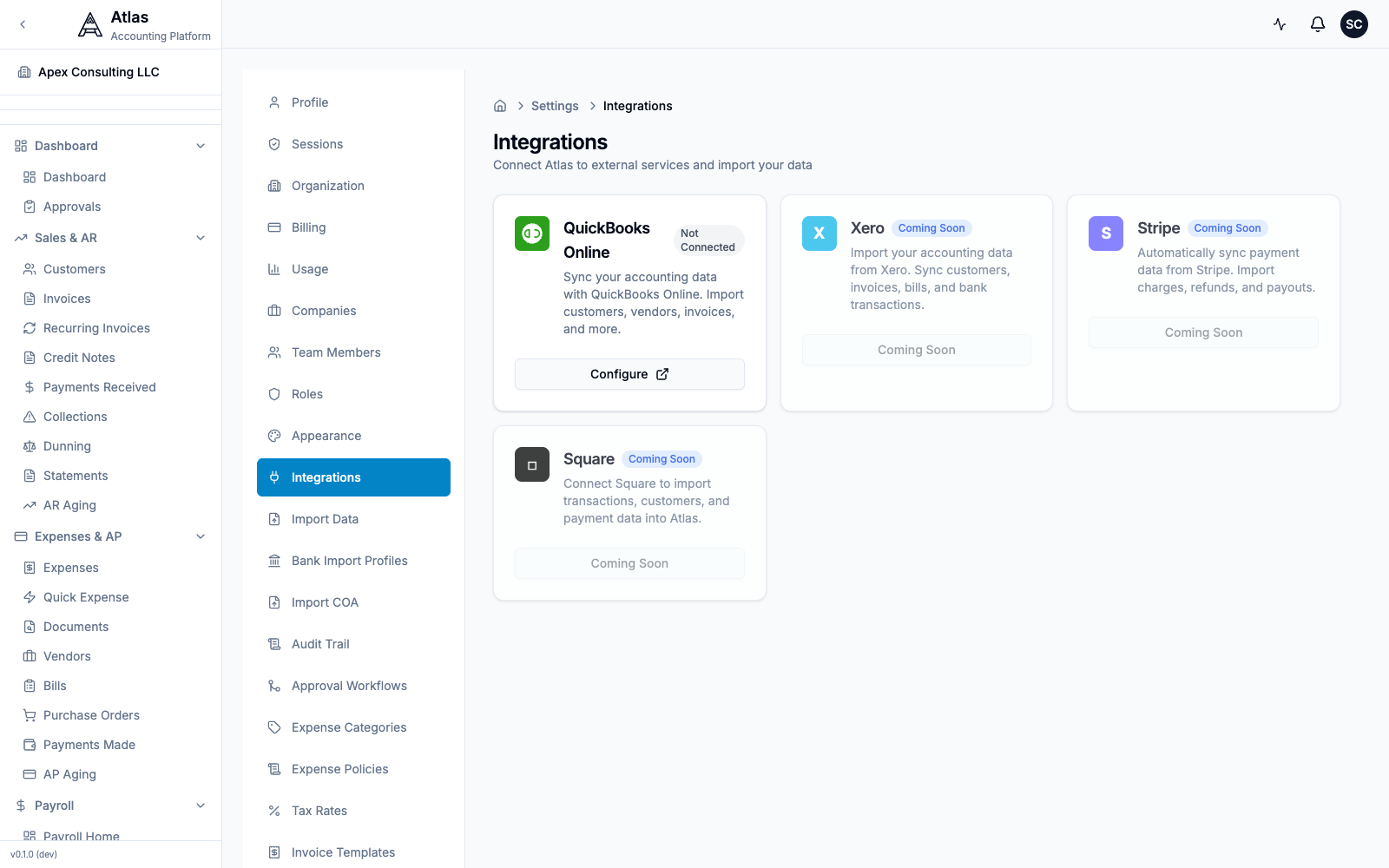 The Settings > Integrations screen. QuickBooks Online is the only connectable provider today; Wave migrates via CSV import.
Step 1: Export from Wave
| Data | How to Export from Wave |
|---|---|
| Chart of Accounts | Accounting > Chart of Accounts > Export (CSV) |
| Customers | Sales > Customers > Export |
| Vendors | Purchases > Vendors > Export |
| Invoices | Sales > Invoices > Export |
| Bills | Purchases > Bills > Export |
| Transactions | Accounting > Transactions > Export (CSV) |
| Bank Statements | Banking > Download statements (CSV/OFX) |
Step 2: Import into Atlas
- Go to Settings > Import Data in Atlas
- Download the matching CSV template (Customers, Vendors, Chart of Accounts, Invoices, or Bills) so your Wave columns line up
- Upload your CSV file and follow the 4-step wizard: Upload → Preview → Import → Complete
- Preview the data, resolve any conflicts, and confirm
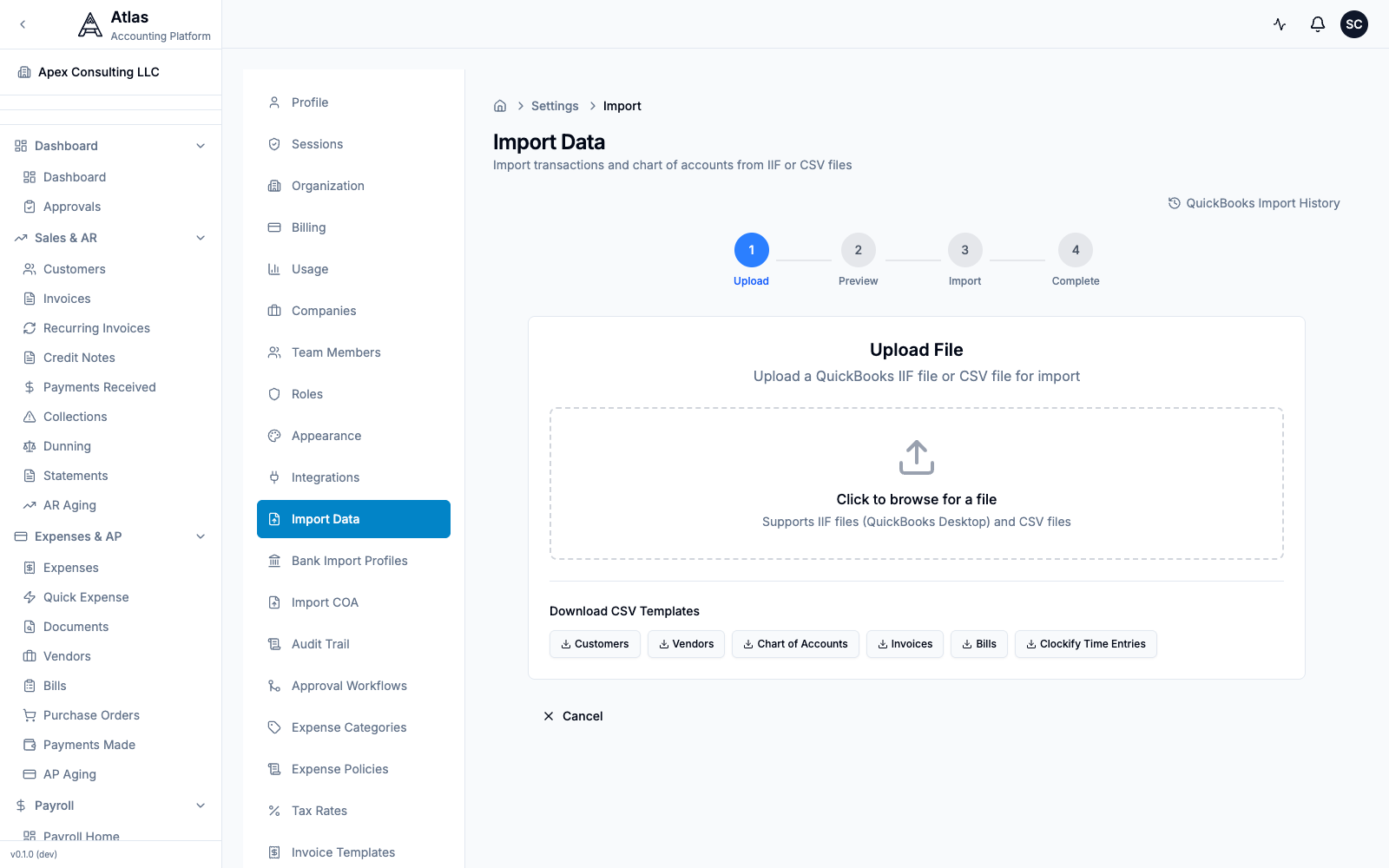 The Settings > Import Data screen: a 4-step Upload → Preview → Import → Complete wizard that accepts CSV or IIF files, with downloadable CSV templates for Customers, Vendors, Chart of Accounts, Invoices, and Bills.
Tip: to import just your chart of accounts, use Settings > Import COA (CSV or XLSX, with a downloadable template).
Step 3: Set Opening Balances
- Pick a cutover date (ideally month-end)
- Run Balance Sheet and P&L in Wave as of that date
- Enter opening balances in Atlas during onboarding
- Verify with an Atlas Trial Balance
Step 4: Verify
- Compare P&L totals between Wave and Atlas
- Match Balance Sheet accounts
- Check AR and AP aging match
- Process a test invoice and payment cycle
10-Minute Setup Checklist
- Sign up and create your organization
- Run the onboarding wizard — company name, country, industry
- Chart of Accounts — import your Wave COA (CSV) or pick a template
- Opening balances — enter from your Wave Balance Sheet
- Import customers — upload your Wave customer export
- Import vendors — upload your Wave vendor export
- Import open invoices and bills — bring over unpaid items
- Add bank accounts — connect for reconciliation
- Invite your team — assign roles
- Run a P&L — compare against Wave for validation
Feature Comparison
| Feature | Wave | Atlas |
|---|---|---|
| Pricing | Free (core accounting) | Subscription-based |
| Double-entry bookkeeping | Yes | Yes |
| Chart of Accounts | Yes | Yes (hierarchical, templated) |
| Invoicing | Yes | Yes + recurring + credit notes |
| Bills & AP | Yes | Yes + purchase orders + approvals |
| Bank reconciliation | Yes | Yes + AI auto-matching |
| AI categorization | Basic | 4-tier with confidence scoring |
| Multi-company | Multiple profiles | Multiple per org + consolidation |
| Consolidated reporting | No | Yes (BS, P&L, CF, TB) |
| Users | Limited | Unlimited |
| User roles | Fixed (basic) | 6 roles, 61 permissions |
| Payroll | Paid add-on (US/CA) | Built-in (5 countries) |
| Multi-currency | Basic (invoicing) | 150+ currencies + FX revaluation |
| Inventory | No | Yes (FIFO, LIFO, WA) |
| Fixed assets | No | Yes (3 depreciation methods) |
| Projects | No | Yes + time tracking |
| Budgets | No | Yes + variance analysis |
| Approval workflows | No | Multi-step with conditions |
| Audit trail | Limited | Field-level, unlimited retention |
| Tax compliance | US/CA | US, UK, CA, AU, EU, PK |
| 1099 forms | No | Yes (NEC, MISC, K) |
| Period close / book locking | No | Yes (monthly + year-end) |
| API | Developer portal | REST (~485 endpoints) |
| Receipt scanning | Yes | Attachments (OCR planned) |
| Mobile app | No | Responsive web |
FAQ
Q: Wave is free. Why should I pay for Atlas? A: Wave's free tier covers basic accounting and invoicing. Atlas includes features Wave charges for (payroll) and features Wave doesn't have at all:
- Multi-entity consolidation
- AI transaction categorization
- 6-country tax compliance (1099, VAT, BAS, GST)
- Approval workflows and RBAC
- Fixed assets, inventory, budgeting, projects
- Enterprise-grade security (database-level RLS)
If you've outgrown Wave's capabilities, Atlas is the next step without the per-seat pricing of QuickBooks or Xero.
Q: I use Wave Payroll. Does Atlas replace it? A: Yes. Atlas includes full payroll for 5 countries with tax calculations, W-2/T4 generation, benefits management, and employee self-service — built into the platform, not a separate product.
Q: Can I import my Wave data? A: Yes. Export your data from Wave as CSV files and import into Atlas using the import wizard at Settings > Import Data. The process takes about 15 minutes.
Q: Wave's receipt scanning is really useful. Does Atlas have it? A: Atlas supports document attachments on all transactions — upload receipts and documents to invoices, bills, and journal entries. AI-powered OCR for automatic data extraction from receipts is planned.
Q: I have multiple businesses on Wave. How does Atlas handle that? A: Atlas supports multiple companies within a single organization. You can switch between companies from the sidebar and generate consolidated reports across all of them — something Wave can't do.
Q: Is Atlas too advanced for a small freelancer or sole proprietor? A: Atlas works for businesses of all sizes. If you need proper accounting (not just invoicing), Atlas provides a clean interface with progressive complexity. Features like Schedule C and quarterly estimates are specifically designed for sole proprietors.
See also: Migration Checklist | QuickBooks Guide | All Guides