QuickBooks Quick Start
Everything you know in QuickBooks, mapped to Atlas
Atlas Quick Start Guide for QuickBooks Users
Everything you know in QuickBooks, mapped to Atlas. Reading time: 8 minutes
Terminology Rosetta Stone
The biggest hurdle when switching is finding your bearings. Here's your translation table:
| QuickBooks Term | Atlas Equivalent | Notes |
|---|---|---|
| Chart of Accounts | Chart of Accounts | Same concept — hierarchical account structure with 5 types |
| Classes | Dimensions | Tag transactions by department, project, location, or any custom segment |
| Locations | Dimensions | Atlas uses a single flexible Dimensions system for all segmentation |
| Items (Products & Services) | Inventory Items / Line Items | Products on invoices and bills |
| Sales Receipts | Invoice + Payment | Atlas separates the invoice from the payment for audit trail |
| Estimates / Quotes | (coming soon) | Use Invoice in draft status as a workaround |
| Memorized Transactions | Recurring Invoices | Auto-generated on a schedule (daily/weekly/monthly/quarterly/annually) |
| Delayed Charges | Draft Invoice Lines | Create invoice lines without sending |
| Bills | Bills | Same concept |
| Checks (for vendor payment) | Payments Made | Record vendor payments with check/ACH/wire method |
| Receive Payments | Payments Received | Apply customer payments to invoices |
| Deposits | Journal Entry (or Bank Transaction) | Record deposits via bank import or manual JE |
| Bank Rules | AI Categorization Rules | Atlas adds AI confidence scoring on top of manual rules |
| Reconcile | Bank Reconciliation | Same workflow — match cleared items to statement balance |
| Accountant Toolbox | Accounting menu | Period Close, Journal Entries, Trial Balance |
| Close Books / Set Closing Date | Period Close | Lock a period to prevent backdated changes |
| Users & Roles | Settings > Team Members | 6 roles: Owner, Admin, Accountant, Bookkeeper, Viewer, Employee |
| Custom Reports | Report Configurations | Save column/filter/grouping presets |
| Apps / Integrations | Settings > Integrations | QuickBooks import, webhooks, API keys |
| Company File / QBO Company | Company (within Organization) | Atlas supports multiple companies per organization |
| 1099 Contractor Tracking | Tax > 1099 Forms | Vendor-level 1099 eligibility + form generation |
| Payroll (add-on) | Payroll (built-in) | Full payroll with W-2, tax calc, benefits — no extra charge |
Where Did My Stuff Go?
| What You Want to Do | In QuickBooks | In Atlas |
|---|---|---|
| Create an invoice | + New > Invoice | Invoices > New Invoice |
| Create a recurring invoice | Recurring Transactions > New | Invoices > Recurring tab |
| Record a customer payment | + New > Receive Payment | Payments > New Payment |
| Create a credit note | + New > Credit Memo | Credit Notes > New Credit Note |
| Enter a vendor bill | + New > Bill | Bills > New Bill |
| Create a purchase order | + New > Purchase Order | Purchase Orders > New PO |
| Pay a vendor | + New > Pay Bills | Payments Made > New Payment |
| Record a journal entry | + New > Journal Entry | Journal Entries > New Entry |
| Import bank transactions | Banking > Upload | Banking > [Account] > Import |
| Reconcile a bank account | Accounting > Reconcile | Banking > [Account] > Reconcile |
| View Chart of Accounts | Accounting > Chart of Accounts | Chart of Accounts (sidebar) |
| Run Profit & Loss | Reports > Profit and Loss | Reports > Profit & Loss |
| Run Balance Sheet | Reports > Balance Sheet | Reports > Balance Sheet |
| Run AR Aging | Reports > A/R Aging Summary | Reports > AR Aging |
| Run AP Aging | Reports > A/P Aging Summary | Reports > AP Aging |
| Run Trial Balance | Reports > Trial Balance | Reports > Trial Balance |
| Close the books | Accounting > Close Books | Accounting > Period Close |
| Manage users | Settings > Manage Users | Settings > Team Members |
| View audit log | None (limited history) | Settings > Audit Trail |
| Run payroll | Payroll tab (paid add-on) | Payroll > Runs (built-in) |
| File 1099s | Expenses > Vendors > Prepare 1099s | Tax > 1099 Forms |
| Connect bank (Plaid) | Banking > Connect Account | Banking > Add Account |
What Atlas Does Better
1. AI-Powered Transaction Categorization
QuickBooks has basic bank rules. Atlas has a 4-tier AI engine:
- Exact match rules → Fuzzy matching → Keyword detection → LLM fallback
- Transactions with 90%+ confidence auto-post. Uncertain items go to a review queue ranked by financial impact.
- The AI learns from every correction you make.
2. Multi-Entity Consolidation
QuickBooks Online doesn't support consolidated reporting across multiple companies. Atlas provides:
- Consolidated Balance Sheet, P&L, Cash Flow, and Trial Balance
- Intercompany eliminations with proportional allocation
- ASC 830 currency translation for multi-currency entities
3. Unlimited Users at No Extra Cost
QuickBooks Online charges $35–$275/month and caps users at 1–25 depending on plan. Atlas includes unlimited users — invite your whole team without worrying about per-seat costs.
4. Database-Level Security
QuickBooks uses application-level data separation. Atlas enforces tenant isolation at the PostgreSQL database level using Row-Level Security — even a code bug can't leak data across organizations.
5. Built-In Payroll (Not a Paid Add-On)
QuickBooks charges extra for payroll. Atlas includes full payroll with:
- Tax calculations (federal, state, FICA)
- W-2 generation
- Benefits and deductions management
- Employee self-service portal
Migration: Import Your QuickBooks Data
QuickBooks Online is the only platform Atlas connects to directly today — the easiest migration path of any competitor. You'll find it under Settings > Integrations, alongside connectors that are on the way (Xero, Stripe, and Square are marked Coming Soon).
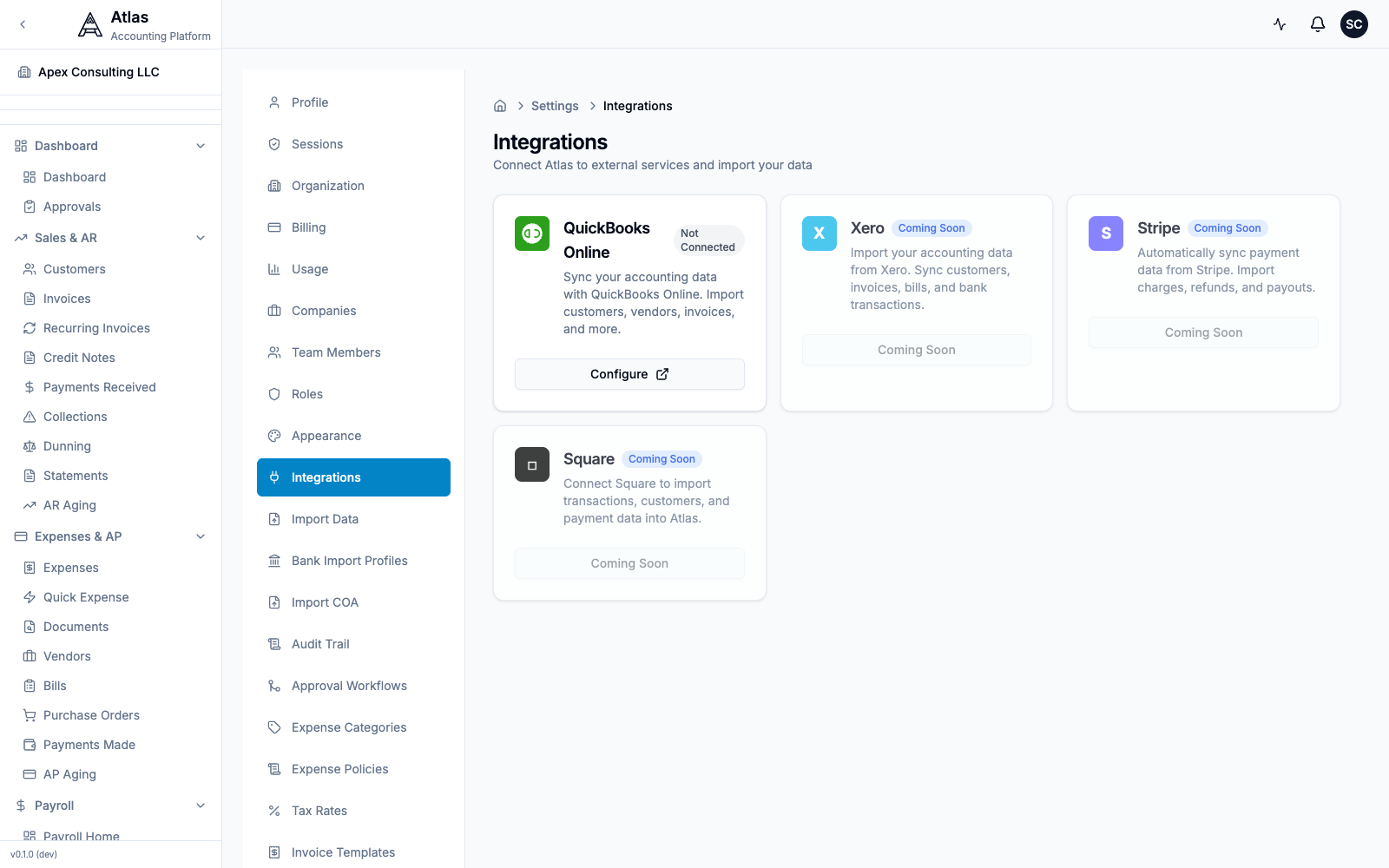 The Settings > Integrations screen. QuickBooks Online shows a Configure button; Xero, Stripe, and Square are marked Coming Soon.
Option A: Direct QuickBooks Online Integration (Recommended for QBO)
The native connector is a guided 5-step wizard: Connect → Select → Preview → Import → Complete.
Who can do this: connecting QuickBooks requires the Admin or Owner role. If you're an Accountant or Bookkeeper, ask an admin to set up the connection — you'll be able to run imports once it's in place.
- Go to Settings > Integrations and click Configure on the QuickBooks Online card.
- Connect — click Connect to QuickBooks; you'll be redirected to QuickBooks to authorize the connection via OAuth2.
- Select — choose which data to bring over. Atlas can import up to 8 entity types:
| Entity | What Gets Imported |
|---|---|
| Accounts | Your entire Chart of Accounts |
| Customers | Names, contacts, terms, tax info |
| Vendors | Names, contacts, terms, 1099 status |
| Invoices | Open and historical invoices with line items |
| Bills | Open and historical bills with line items |
| Payments Received | Customer payment history |
| Payments Made | Vendor payment history |
| Bank Transactions | Bank feed transaction history |
- Preview — Atlas shows what will be imported and flags potential duplicates or conflicts.
- Import — confirm, and Atlas imports your data with progress tracking for each entity type.
- Complete — review the import summary.
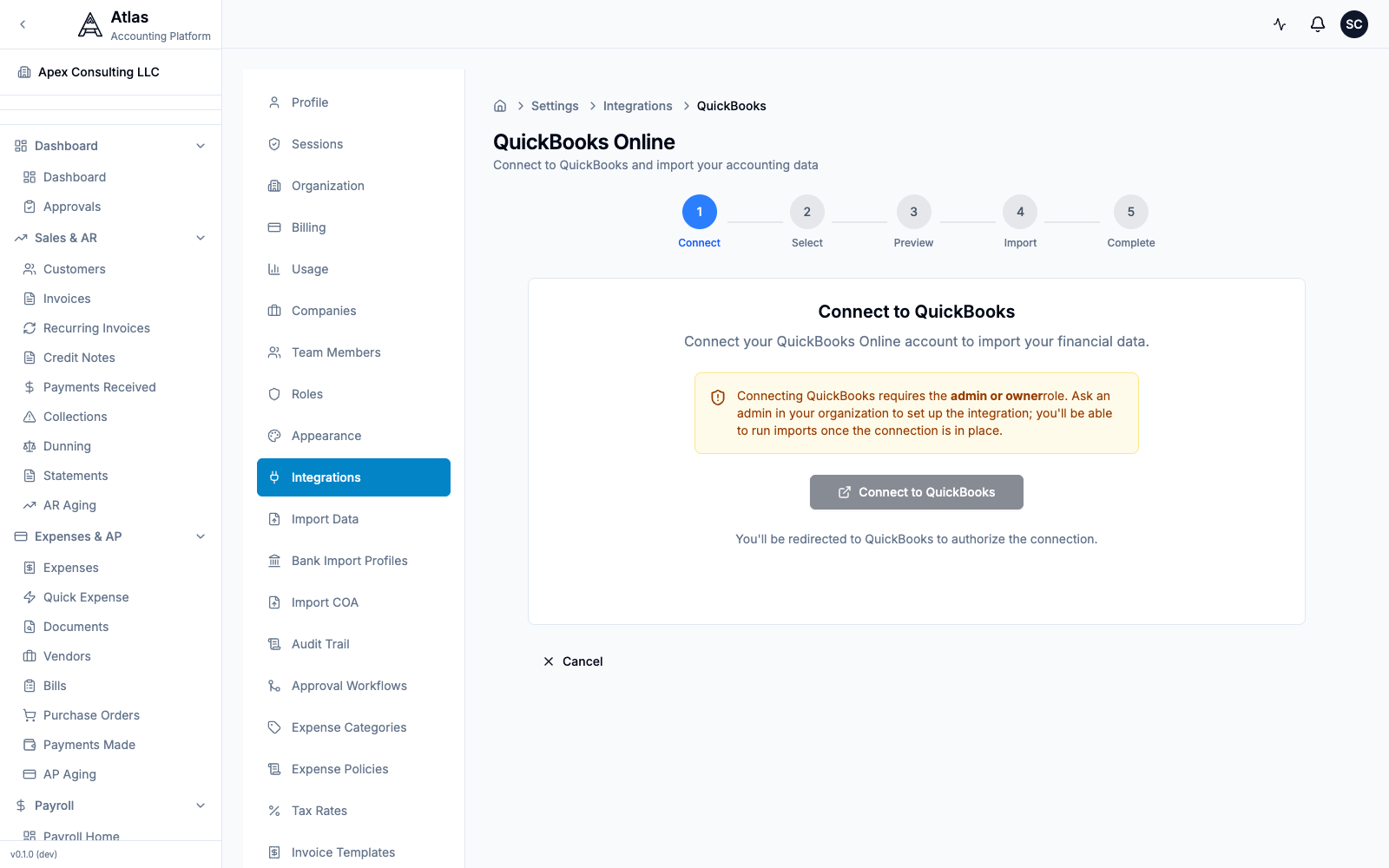 The QuickBooks Online connect wizard, showing the Connect → Select → Preview → Import → Complete steps and a notice that connecting requires the admin or owner role.
Option B: File Import (For QuickBooks Desktop)
- In QuickBooks Desktop, go to File > Utilities > Export > Lists to IIF Files
- Export your Chart of Accounts, Customer List, Vendor List
- For transactions, use File > Utilities > Export > Transactions to IIF
- In Atlas, go to Settings > Import Data and upload your IIF files
- Atlas walks you through a 4-step wizard (Upload → Preview → Import → Complete), validating the data and showing a preview before importing
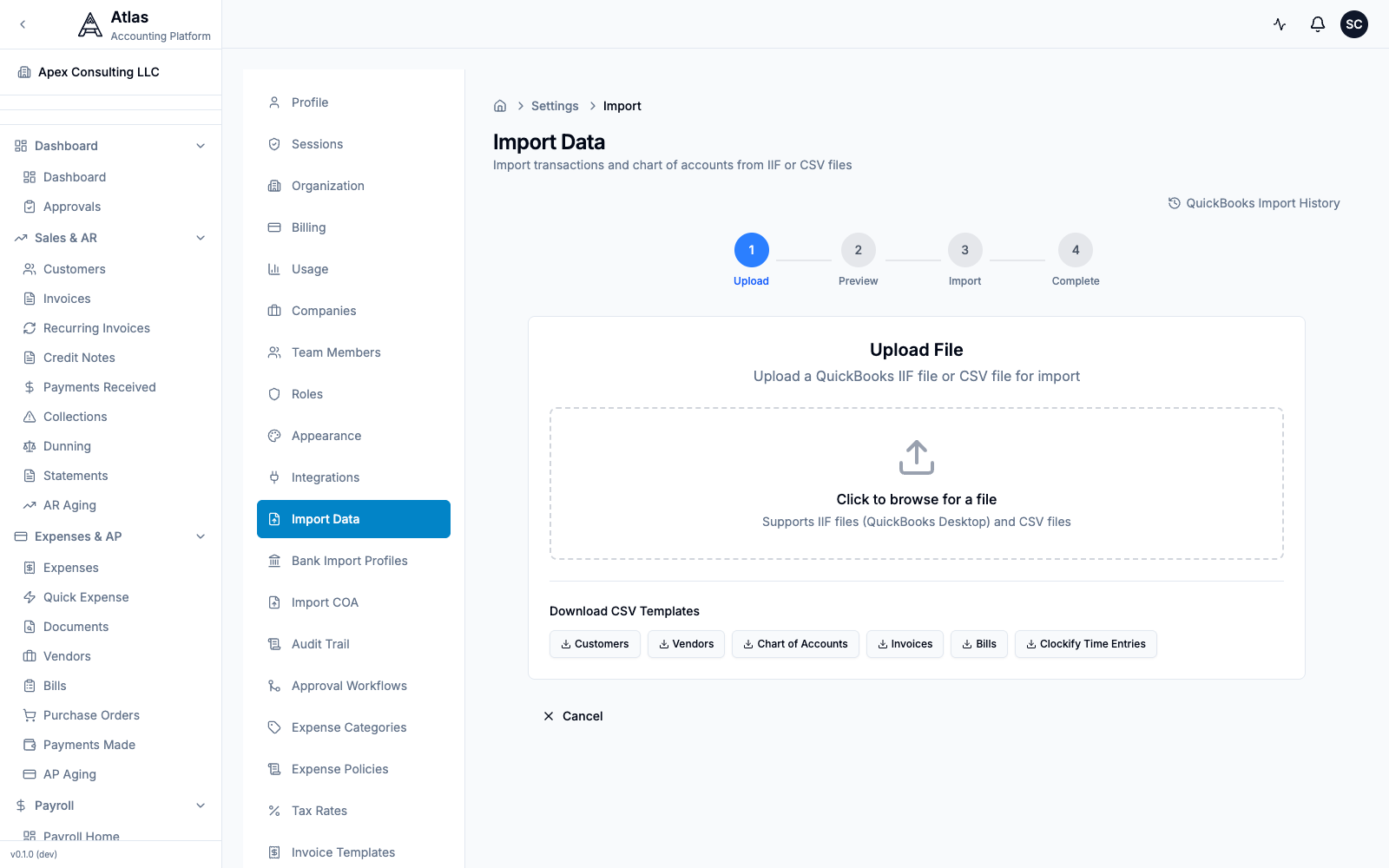 The Settings > Import Data screen. A 4-step Upload → Preview → Import → Complete wizard accepts IIF or CSV files, with downloadable CSV templates for Customers, Vendors, Chart of Accounts, Invoices, and Bills.
Option C: CSV Export
- Run reports in QuickBooks (Customer List, Vendor List, etc.) and export each to CSV
- In Atlas, go to Settings > Import Data — download the matching CSV template (Customers, Vendors, Chart of Accounts, Invoices, or Bills) so your columns line up
- Upload your file; Atlas previews the data before you confirm the import
Tip: to import just your chart of accounts, use Settings > Import COA, which accepts a CSV or XLSX file (max 5 MB) and includes a downloadable template.
10-Minute Setup Checklist
- Sign up and create your organization
- Run the onboarding wizard — set your company name, country, industry
- Chart of Accounts — select a US GAAP template (or import your QBO chart)
- Connect QuickBooks — Settings > Integrations > QuickBooks > Configure (Admin/Owner role required)
- Import data — accounts, customers, vendors, invoices, bills
- Enter opening balances — or let the QBO import handle historical data
- Add bank accounts — connect for reconciliation
- Invite your team — assign roles (Accountant, Bookkeeper, Viewer)
- Create a test invoice — verify your workflow
- Run a Trial Balance — compare against QuickBooks to validate
Feature Comparison
| Feature | QuickBooks Online | Atlas |
|---|---|---|
| Double-entry bookkeeping | Yes | Yes |
| Chart of Accounts | Yes | Yes (hierarchical, 5 types) |
| Invoicing | Yes | Yes + recurring + credit notes |
| Bills & AP | Yes | Yes + purchase orders |
| Bank reconciliation | Yes | Yes + AI auto-matching |
| AI transaction categorization | Basic rules | 4-tier AI with confidence scoring |
| Multi-company | Separate subscriptions | Multiple companies per org |
| Consolidated reporting | No | Yes (BS, P&L, CF, TB) |
| Intercompany eliminations | No | Yes |
| Users | 1–25 (by plan) | Unlimited |
| Payroll | Paid add-on | Built-in |
| 1099 forms | Yes | Yes (NEC, MISC, K) |
| Schedule C | No | Yes |
| State sales tax | Yes | Yes |
| Quarterly estimates | No | Yes |
| Multi-currency | Plan-gated | 150+ currencies |
| FX revaluation | No | Yes |
| Inventory | Basic | FIFO, LIFO, Weighted Average |
| Fixed assets | No | Yes (3 depreciation methods) |
| Project tracking | Yes | Yes + time tracking |
| Budgets | Yes | Yes + variance analysis |
| Approval workflows | Advanced plan only | Built-in (multi-step) |
| Audit trail | 2-year retention | Unlimited, field-level changes |
| Custom roles | Advanced plan only | 6 predefined roles, 61 permissions |
| Tax compliance countries | US-centric | US, UK, CA, AU, EU, PK |
| API | Yes | Yes (~485 endpoints) |
| Mobile app | Yes | Responsive web (native app planned) |
FAQ
Q: Where are my Classes? A: Atlas uses Dimensions — a flexible tagging system that replaces Classes, Locations, and any other segmentation. Go to Settings > Dimensions to set up your segments.
Q: Can I import my QuickBooks file directly? A: Yes! For QBO, use the direct OAuth2 import at Settings > Integrations > QuickBooks (an Admin or Owner sets up the connection). For Desktop, export to IIF format and upload via Settings > Import Data.
Q: Do I need to re-enter all my transactions? A: No. The QuickBooks import brings over your accounts, customers, vendors, invoices, bills, payments, and bank transactions. For opening-balance-only migration, enter balances as of your cutover date.
Q: Where is the "+" (Plus) menu? A: Atlas doesn't have a single "+" menu. Each module has its own "New" button (e.g., Invoices > New Invoice). You can also use Cmd+K to quickly navigate to any create action.
Q: Can multiple people work at the same time? A: Yes, with no user limits. Atlas supports concurrent users with role-based permissions. Bookkeepers can enter data while Accountants review and approve.
Q: What about my bank feeds? A: Atlas supports bank statement import in CSV and Excel (.xlsx) formats, with AI-assisted auto-matching. Live Plaid bank feeds are coming soon.
Q: Is there a QuickBooks Desktop version of Atlas? A: Atlas is cloud-only. It works in any modern browser — no software to install. Your data is accessible from anywhere with internet access.
Q: What happens to my QuickBooks subscription? A: Keep it active during your parallel-run period (typically 1 month). Once you've validated Atlas matches your reports, you can cancel QuickBooks.
See also: Migration Checklist | Xero Guide | All Guides