Sage 50 Quick Start
Everything you know in Sage 50 / Peachtree, mapped to Atlas
Atlas Quick Start Guide for Sage 50 / Peachtree Users
Everything you know in Sage 50 (Peachtree), mapped to Atlas. Reading time: 7 minutes
Terminology Rosetta Stone
| Sage 50 / Peachtree Term | Atlas Equivalent | Notes |
|---|---|---|
| Chart of Accounts | Chart of Accounts | Same concept — hierarchical with account numbers |
| General Journal Entry | Journal Entry | Same — multi-line debit/credit entries |
| Maintain menu | Settings | Configuration and master data management |
| Maintain > Customers/Prospects | Customers | Customer management for AR |
| Maintain > Vendors | Vendors | Vendor management for AP |
| Sales/Invoicing | Invoices | Customer billing |
| Purchase Orders | Purchase Orders | Same — with conversion to bills |
| Payments (vendor) | Payments Made | Vendor payment recording |
| Receipts (customer) | Payments Received | Customer payment application |
| Write Checks | Payments Made (check method) | Select "Check" as payment method |
| Bank Reconciliation | Bank Reconciliation | Same workflow |
| Tasks menu | Sidebar navigation | All actions accessible from sidebar |
| Reports & Forms | Reports | All financial reports |
| General Ledger | General Ledger (report) | Transaction-level account detail |
| Financial Statements | Reports (BS, P&L, CF) | Standard financial reports |
| Payroll (built-in) | Payroll (built-in) | Both include payroll — Atlas adds 5-country support |
| Inventory Items | Inventory Items | Same — Atlas adds multiple costing methods |
| Job Costing | Projects | Project tracking with time and expense allocation |
| Departments | Dimensions | Tag transactions by department or other segments |
| Account Segments | Dimensions | Atlas uses Dimensions instead of account number segments |
| Audit Trail | Audit Trail | Same concept — Atlas adds field-level tracking |
| Security > Users | Settings > Team Members | User management with role assignment |
| Company File (.SAJ) | Organization > Company | Cloud-based — no local files |
| Select a Period | Period selector (in reports) | Filter by date range or fiscal period |
| Close Fiscal Year | Period Close (Year-End Close) | Locks the year and posts income summary |
| Action Items | Dashboard | Overview of tasks requiring attention |
| Void Check | Void Payment | Reverse a payment with audit trail |
Where Did My Stuff Go?
| What You Want to Do | In Sage 50 | In Atlas |
|---|---|---|
| Create an invoice | Tasks > Sales/Invoicing | Invoices > New Invoice |
| Enter a vendor bill | Tasks > Purchases/Receive Inventory | Bills > New Bill |
| Create a purchase order | Tasks > Purchase Orders | Purchase Orders > New PO |
| Write a check | Tasks > Write Checks | Payments Made > New Payment (check method) |
| Receive a payment | Tasks > Receive Money | Payments > New Payment |
| Record a journal entry | Tasks > General Journal Entry | Journal Entries > New Entry |
| Reconcile bank account | Tasks > Account Reconciliation | Banking > [Account] > Reconcile |
| View Chart of Accounts | Maintain > Chart of Accounts | Chart of Accounts (sidebar) |
| Add a customer | Maintain > Customers/Prospects | Customers > New Customer |
| Add a vendor | Maintain > Vendors | Vendors > New Vendor |
| Run Profit & Loss | Reports > Financial Statements > Income Statement | Reports > Profit & Loss |
| Run Balance Sheet | Reports > Financial Statements > Balance Sheet | Reports > Balance Sheet |
| Run Trial Balance | Reports > General Ledger > Trial Balance | Reports > Trial Balance |
| Run AR Aging | Reports > Accounts Receivable > Aged Receivables | Reports > AR Aging |
| Close fiscal year | Tasks > System > Close Fiscal Year | Accounting > Period Close |
| Manage users | Maintain > Users > Set Up Security | Settings > Team Members |
| Run payroll | Tasks > Payroll Entry | Payroll > Runs |
| Manage inventory | Maintain > Inventory Items | Inventory (sidebar) |
| Job costing | Maintain > Jobs | Projects (sidebar) |
What Atlas Does Better
1. Cloud-Native — No File Management
Sage 50 stores data in local company files (.SAJ). You deal with file corruption, backups, and version conflicts. Atlas is fully cloud-based — your data is always accessible, always backed up, and supports multiple simultaneous users.
2. AI-Powered Bank Reconciliation
Sage 50's reconciliation is fully manual — you check off items one by one. Atlas imports bank statements (CSV, Excel) and uses AI-powered matching with confidence scoring to auto-match most transactions, saving hours per month.
3. Multi-Entity Consolidation
Sage 50 requires separate company files and manual consolidation via Excel. Atlas supports multiple companies within one organization with built-in consolidated Balance Sheet, P&L, Cash Flow, and Trial Balance.
4. Modern Web Interface
Sage 50 is a Windows desktop application with a dated interface. Atlas runs in any modern browser with:
- Dark mode, 7 color themes
- Command palette (Cmd+K) for instant navigation
- Responsive design for tablet/phone
- Real-time collaboration — no "this file is in use by another user" errors
5. Multi-Country Tax Compliance
Sage 50 is primarily US-focused. Atlas supports tax compliance for US, UK, Canada, Australia, EU (VAT OSS), and Pakistan — including 1099s, VAT MTD, BAS, GST/HST, and WHT.
Migration: Moving from Sage 50 to Atlas
Sage 50 isn't a direct-connect integration — the only native connector today is QuickBooks Online (Xero is marked Coming Soon under Settings > Integrations). Migrating from Sage 50 is a file-based export and import: get your lists and balances out of Sage as CSV, then bring them into Atlas with the import wizard.
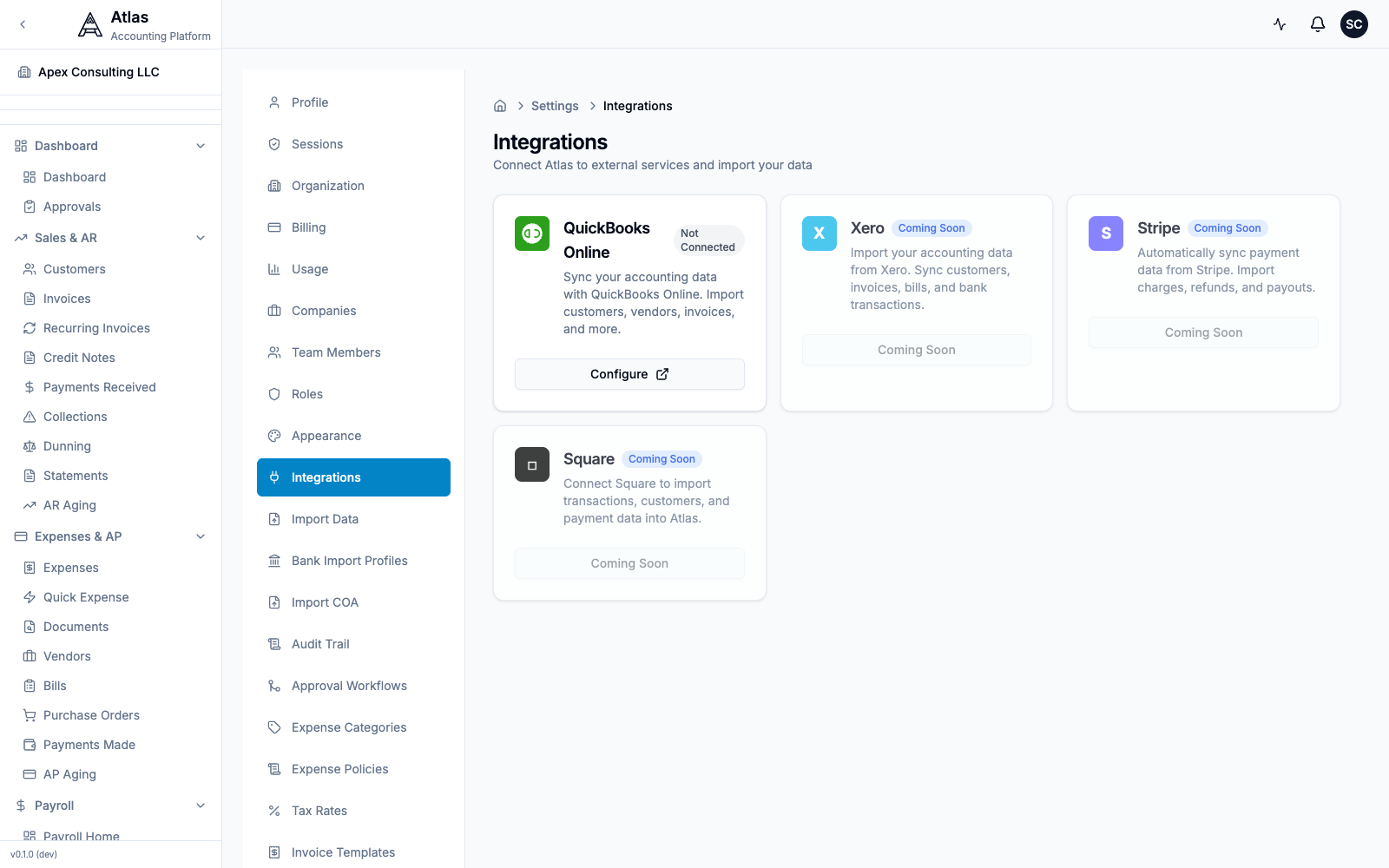 The Settings > Integrations screen. QuickBooks Online is the only connectable provider today; Sage 50 migrates via CSV import.
Step 1: Export from Sage 50
| Data | How to Export from Sage 50 |
|---|---|
| Chart of Accounts | Maintain > Chart of Accounts > File > Export (CSV) |
| Customer List | Maintain > Customers > File > Export |
| Vendor List | Maintain > Vendors > File > Export |
| General Ledger | Reports > General Ledger > export to Excel/CSV |
| AR Aging | Reports > Accounts Receivable > Aged Receivables > Export |
| AP Aging | Reports > Accounts Payable > Aged Payables > Export |
| Inventory Items | Maintain > Inventory Items > File > Export |
Alternative: Use File > Utilities > Export to export lists and transactions.
Step 2: Import into Atlas
- Go to Settings > Import Data in Atlas
- Download the matching CSV template (Customers, Vendors, Chart of Accounts, Invoices, or Bills) so your Sage columns line up
- Upload your CSV file and follow the 4-step wizard: Upload → Preview → Import → Complete
- Preview the data, resolve any conflicts, and confirm
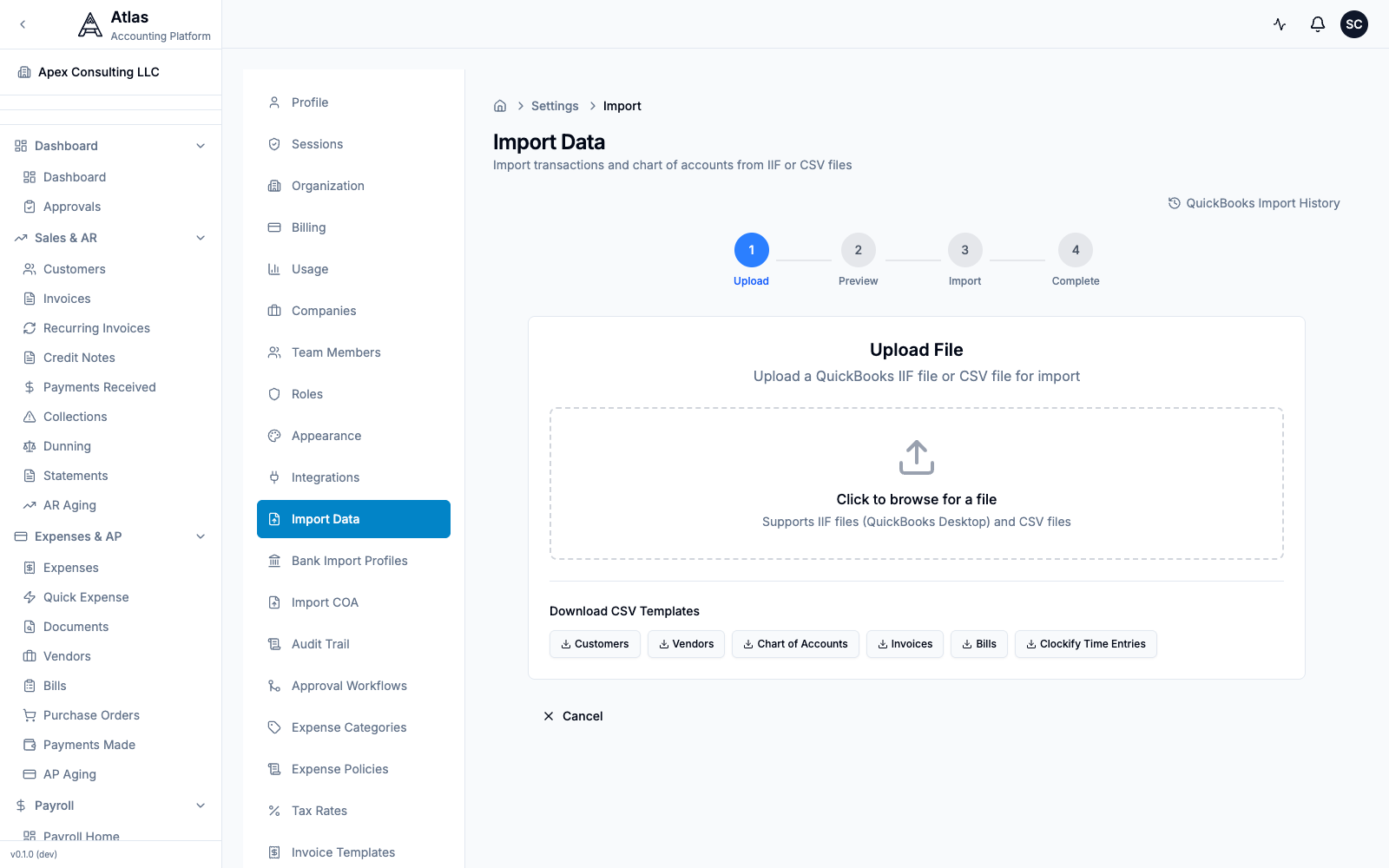 The Settings > Import Data screen: a 4-step Upload → Preview → Import → Complete wizard that accepts CSV or IIF files, with downloadable CSV templates for Customers, Vendors, Chart of Accounts, Invoices, and Bills.
Tip: to import just your chart of accounts, use Settings > Import COA (CSV or XLSX, with a downloadable template).
Step 3: Set Opening Balances
- Choose your cutover date — month-end after your last Sage 50 reconciliation
- Run a Trial Balance in Sage 50 as of that date
- In Atlas onboarding, enter opening balances for each account
- Run an Atlas Trial Balance and compare against Sage 50
Step 4: Verify
- Compare P&L between both systems for the same period
- Match Balance Sheet totals
- Verify AR and AP aging match
- Process a test billing cycle in Atlas
10-Minute Setup Checklist
- Sign up and create your organization
- Run the onboarding wizard — company name, country, fiscal year
- Chart of Accounts — import your Sage COA (CSV) or pick a US GAAP template
- Opening balances — enter balances from your Sage Trial Balance
- Import customers — upload your customer list export
- Import vendors — upload your vendor list export
- Add bank accounts — set up for reconciliation
- Set up Dimensions — recreate your Sage Departments/Segments
- Invite your team — assign roles (Accountant, Bookkeeper, Viewer)
- Run a Trial Balance — verify it matches Sage 50
Feature Comparison
| Feature | Sage 50 (Peachtree) | Atlas |
|---|---|---|
| Deployment | Desktop (Windows only) | Cloud (any browser) |
| Double-entry bookkeeping | Yes | Yes |
| Chart of Accounts | Yes (with segments) | Yes (hierarchical + Dimensions) |
| Invoicing | Yes | Yes + recurring + credit notes |
| Bills & AP | Yes | Yes + purchase orders |
| Bank reconciliation | Manual matching | AI-powered auto-matching |
| AI categorization | No | Yes (4-tier with confidence) |
| Multi-company | Separate files | Multiple per organization |
| Consolidated reporting | Manual (Excel) | Built-in (BS, P&L, CF, TB) |
| Multi-user access | Network license | Unlimited cloud users |
| Payroll | Built-in (US) | Built-in (US, UK, CA, AU, PK) |
| Multi-currency | Yes (limited) | 150+ currencies |
| FX revaluation | No | Yes |
| Inventory | Yes | Yes (FIFO, LIFO, WA) |
| Fixed assets | Yes | Yes (3 methods) |
| Job costing | Yes | Yes (Projects + time tracking) |
| Budgets | Yes | Yes + variance analysis |
| Departments / Dimensions | Account segments | Unlimited Dimensions |
| Approval workflows | No | Multi-step with conditions |
| Audit trail | Basic | Field-level with old/new values |
| Tax compliance | US | US, UK, CA, AU, EU, PK |
| API | No | REST (~485 endpoints) |
| Mobile | No | Responsive web |
FAQ
Q: I'm used to Sage's "Tasks" menu for everything. Where is it? A: Atlas uses a sidebar navigation organized by module (Invoices, Bills, Banking, Reports, etc.). Press Cmd+K (Mac) or Ctrl+K (Windows) to open the command palette and type what you want to do — it's the fastest way to navigate.
Q: What about my Sage account segments (like 100-10 for Department 10)? A: Atlas uses Dimensions instead of account number segments. This is more flexible — you can tag any transaction with multiple dimensions (department, project, location) without embedding segments in account numbers.
Q: Will I lose my transaction history? A: You can import historical transactions via CSV. For most migrations, we recommend importing opening balances as of your cutover date plus open invoices and bills. Keep Sage 50 installed read-only for historical reference.
Q: Sage 50 has file-based backups. How does Atlas backup data? A: Atlas is cloud-hosted with automated daily backups, point-in-time recovery, and encrypted data at rest. No manual backup management needed.
Q: Can multiple people use Atlas at the same time? A: Yes. Unlike Sage 50's file locking, Atlas is designed for concurrent multi-user access with role-based permissions. No more "this company is currently in use" errors.
Q: What about Sage 50's built-in payroll? A: Atlas also includes built-in payroll, expanded to 5 countries (US, UK, Canada, Australia, Pakistan) with tax calculations, W-2 generation, benefits management, and employee self-service.
See also: Migration Checklist | QuickBooks Guide | All Guides